





.webp)
In May 2026, a company was hit with a $500 million AI bill for a single month. The company had rolled out unlimited access to a frontier model without setting any usage limits or spending caps.
While this is an extreme case, reports have consistently pointed out that 40 to 60% of enterprise token budgets are pure waste.
The reason? When a team builds its first successful AI agent, they naturally choose the most capable frontier model available. Once that agent succeeds in production, the team begins extending that exact same model to every single agent that follows.
This architectural shortcut leaves the organization running one model for every task. And this is where infrastructure costs start to spiral out of hand. Not because tokens are expensive, the prices have actually been falling, but because enterprises are consistently matching low-complexity tasks with high-cost reasoning engines.
Choosing the right model for AI agents is an architectural decision that affects every layer of your agentic AI system.
The triple threat of latency, reliability, and costs
High costs are just one part of the problem. Relying on a single frontier model across an entire agent ecosystem introduces three distinct challenges:
1. High latency
Frontier reasoning models are built to think carefully before responding, and that deliberation takes time. When an agent's entire job is to detect whether a user sounds frustrated, which takes a fraction of a second, routing it through a deep reasoning model adds latency without improving the output.
The heavier model doesn't make the decision better. It just makes the user wait longer for an answer that a lighter model would have reached just as well.
2. Reliability gaps
Routing every agent through a single model provider creates a single point of failure. A provider outage, a rate-limit breach, or credit exhaustion can take down your entire multi-agent system simultaneously, with no continuity.
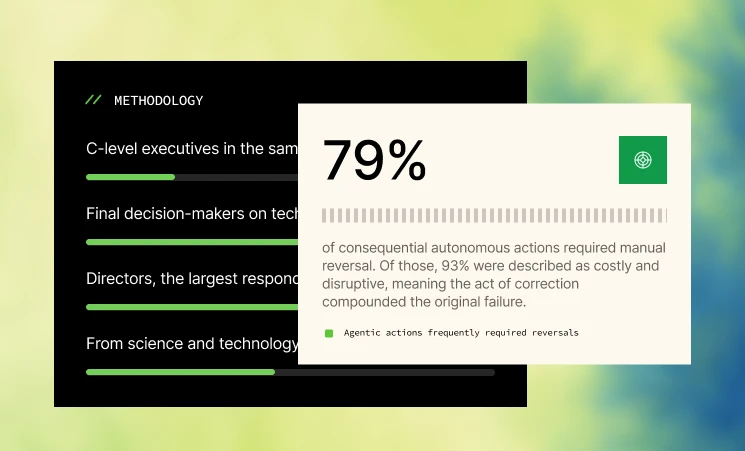
That reliability problem becomes harder to manage as agent ecosystems grow. In fact, Kore.ai’s Agent Productivity Index 2026 found that 42% of enterprises experienced measurable revenue loss as a direct result of an AI agent failure in production. This shows that the impact of wrong model choice can move quickly from engineering to revenue.
3. High costs
Cost compounds faster than most teams anticipate. A single overpowered model call seems negligible. But when you're running thousands of agent conversations daily, choosing a model that's more powerful than any given task demands means paying that premium on every single call; at a scale that grows proportionally with every new user your product attracts.
A framework for choosing the right model
Before assigning models, you need to answer these six foundational questions:
1. What does the agent actually do?
Not every agent needs the same kind of intelligence. A routing agent needs speed and consistency. A supervisor agent needs reliable tool selection and orchestration. A voice agent needs low latency and concise responses. A research agent needs deeper reasoning and more context.
That’s why the first step is to identify the agent’s job clearly. Is the agent classifying intent? Extracting structured data? Answering from enterprise knowledge? Calling tools? Coordinating other agents? Handling voice? Processing documents or images? Performing analysis or synthesis?
Once the task type is clear, the model choice becomes easier.
2. Where does the model need to run?
The next question is where the model can run and what data it is allowed to touch. For agents processing general business queries, a cloud-hosted frontier model works fine.
But for agents handling patient records, financial transactions, legal documents, or anything subject to GDPR or HIPAA, the question changes to: Can your data leave your infrastructure?
If the answer is no, then the model strategy needs to account for private deployment. This is where Small Language Models (SLMs) can be a strong fit. SLMs like Phi, Mistral, Llama, and Gemma can be deployed entirely on-premises or within a private cloud, ensuring sensitive data never crosses a corporate firewall.
3. What is the real running cost?
While the price of a single AI token is going down, the total cost of using cloud-based AI from major providers like Anthropic and OpenAI is creeping up. This is because, as agents multiply and usage scales, the aggregate volume of calls more than offsets the per-token savings.
For workloads that don't require cutting-edge reasoning, enterprises are increasingly asking whether those tasks need cloud-tier intelligence at all, or whether a smaller model running on local or private hardware delivers equivalent output at a fraction of the ongoing cost.
For high-volume, narrow-scope workloads with predictable inputs, the total cost of ownership for a self-hosted SLM can often break even within months compared to sustained API spend.
4. Should you buy, fine-tune, or build?
Once you know what the agent does and where the model needs to run, the next decision is sourcing. Not every agent needs a custom model. But not every agent should rely on a general-purpose API forever, either.
- For early experimentation, low-volume workflows, broad reasoning, or highly ambiguous user inputs, buying access to a commercial frontier model is often the fastest path.
- For high-volume, repetitive tasks, fine-tuning an open-source model can be more attractive. A smaller model trained on company-specific workflows or historical examples may perform very well while reducing inference cost and improving control.
- For highly specialized or regulated workflows, enterprises may consider a domain-specific model or bring-your-own-model strategy. In fact, for regulated industries, Gartner recommends pivoting from experimenting with general-purpose LLMs to deploying Domain-Specific Language Models (DSLMs) tuned to their field.
5. What is the operational latency SLA?
Latency requirements vary dramatically across agent types, and they should drive model selection as much as capability does.
For instance, real-time voice agents require end-to-end response times of under 200 milliseconds to preserve natural conversational flow. Relying on a cloud-hosted model makes this performance impossible due to network round-trips.
An edge agent in manufacturing or logistics may need a local model that can run even when network access is limited. On the other hand, a batch-processing workflow can tolerate slower processing if the output is more analytical and complete.
6. What is the business risk if the agent fails?
Your organization's operational risk tolerance should actively shape your model selection and governance layer.
An agent summarizing internal documentation introduces very low risk if a minor hallucination occurs. Conversely, an agent authorized to trigger financial transactions or evaluate compliance workflows can introduce severe legal and financial liabilities.
High-stakes agents require stronger reasoning, stricter output constraints, better evaluation sets, human review, audit logs, and fallback models. Low-risk, high-volume agents may prioritize speed and cost efficiency instead.
The enterprise model matrix
Answering the six foundational questions above naturally simplifies your model choice. Gartner categorizes AI models into three tiers:
- Frontier models: most competent models designed for complex, multi-step reasoning
- Commodity models: balanced, reliable models built for general-purpose workflows and everyday enterprise tasks
- Compact models: specialized, low-latency, low-cost models optimized for narrow tasks
Right now, very few organizations utilize this full spectrum effectively. Fewer than 10% of enterprises currently run a balanced portfolio across all three model tiers. Most are either over-indexing on frontier models or leaving efficient compact models entirely unused. However, by 2028, Gartner predicts that figure will rise to 50%.
The matrix below maps your operational requirements to the ideal model tier:
The power of model configuration
Model selection represents only the first step of agent optimization. There’s the second principle: the same model, configured differently, can behave like an entirely different tool.
Consider running the same frontier model on two agents simultaneously:
First, an escalation-detection agent. The escalation agent has extended thinking disabled, verbosity set to minimal, and a strict token budget. It responds in under a second and costs very little per call.
Second, a complex reasoning agent. The reasoning agent has extended thinking enabled, a generous reasoning budget, and detailed output. Both run on the same underlying model, but in terms of output, cost, and behaviour, they're completely different tools.
This is why model selection has two distinct parts: which model to use, and how to configure it for the specific job that the agent does. Together, this is what multi-model orchestration looks like, and getting it right across a growing agent system is where most enterprises struggle.
How Kore.ai's Agent Platform helps you choose the right model
Kore.ai's Agent Platform provides you with the freedom to choose any model for any agent cloud-hosted frontier models, open-source SLMs, fine-tuned domain models, or custom endpoints and also to configure the same model differently for different tasks.
It helps you achieve this through four capabilities:
1. A provider-neutral model catalog
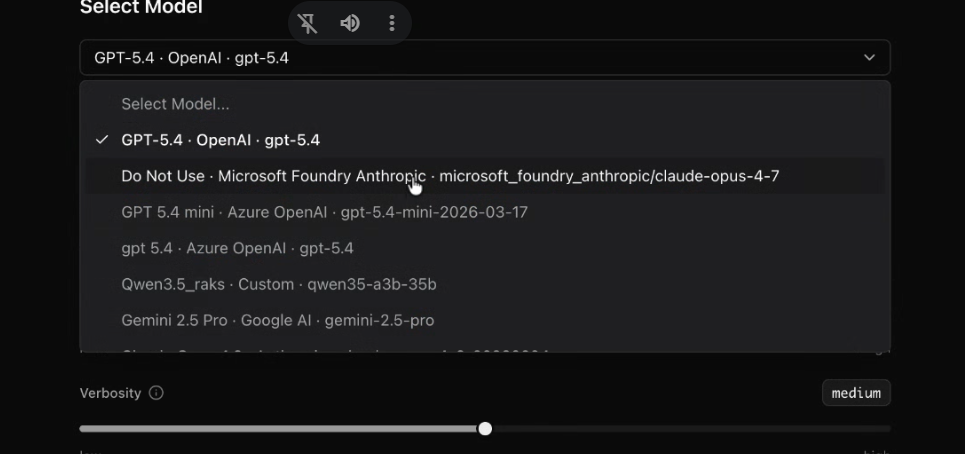
Many enterprises do not choose models in a vacuum. They have cloud agreements, preferred vendors, security requirements, and regional deployment needs. They may want to use open-source models for some tasks and enterprise-hosted models for sensitive workflows.
Kore.ai Agent Platform bypasses this by being cloud-, data-, and model-agnostic. This means that you can register any provider, Anthropic, OpenAI, Google, Amazon Bedrock, Azure OpenAI, or a custom self-hosted via LiteLLM, and manage all credentials centrally. Open-weight models like Llama, Mistral, Gemma, and DeepSeek are supported too.
The choice of model is driven by what the task needs, not by which vendor your procurement team already has a contract with.
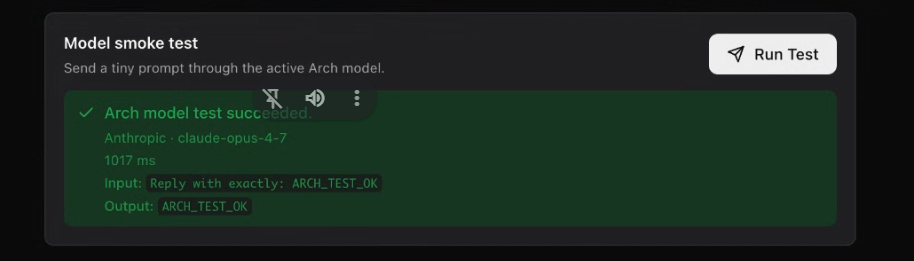
Before deploying any model, you can run a smoke test to confirm the connection is live, validate input and output compatibility, and measure response latency. It is a straightforward check, but it catches configuration problems before live users ever touch the system.
2. Per-agent model assignment and configuration
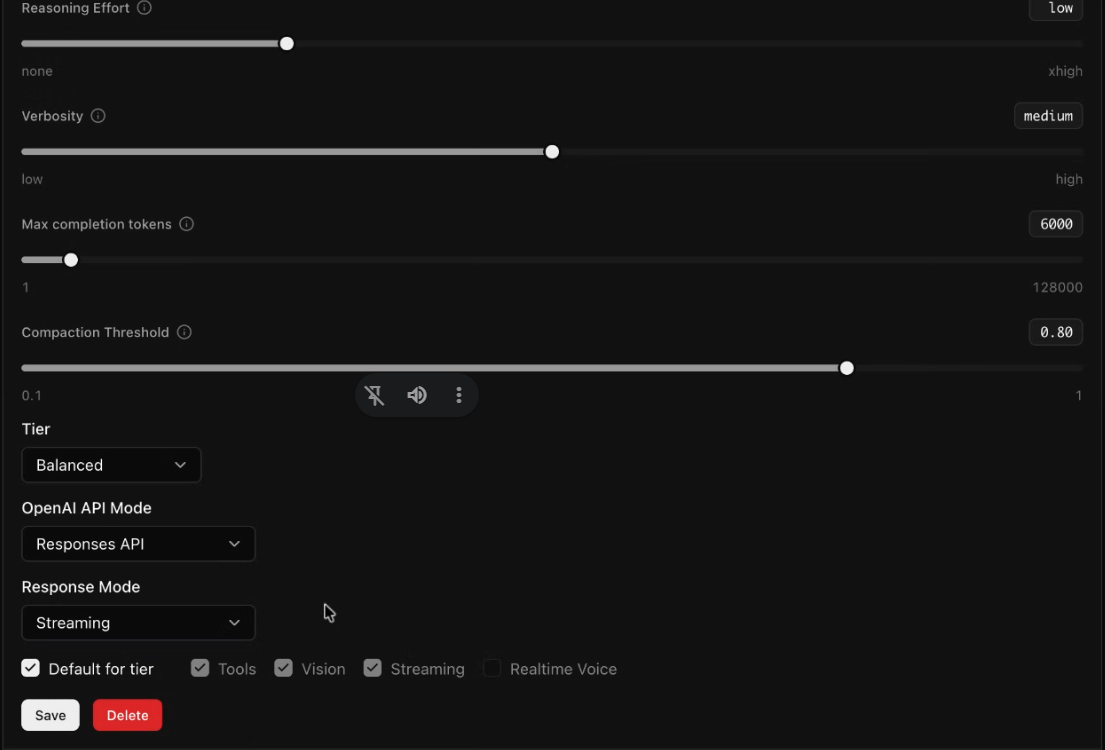
Once your model catalog is set up, the next question is where each model should be used.
Rather than applying a blanket platform default, Kore.ai's Agent Platform lets you assign a model at the agent level. This means each agent in the system gets its own model and its own configuration suited to the task it performs.
You can configure it across the key parameters:
- Reasoning effort: Controls how deeply a model evaluates a prompt before responding. You can scale this high for complex multi-step analysis, or disable it entirely for straightforward tasks to eliminate expensive overhead.
- Verbosity: Controls response length. A voice agent needs short, natural-sounding output that works when spoken aloud. A research-synthesis agent needs thorough, detailed responses. Match this for the kind of user experience you’re designing.
- Context compaction: Manages how much conversation history flows into each call. Long interactions accumulate tokens rapidly. For agents handling brief interactions, carrying a large context window is a waste. For agents managing complex multi-turn conversations, compaction threshold becomes a meaningful performance and cost variable.
- Streaming: Controls whether responses are delivered progressively as they're generated or all at once. For voice agents, streaming dramatically reduces perceived latency. For research portals where the complete response matters, non-streaming is cleaner.
Getting these settings right per agent, rather than accepting defaults everywhere, is where the most meaningful cost and latency optimization lives.
3. Intelligent optimization with ARCH
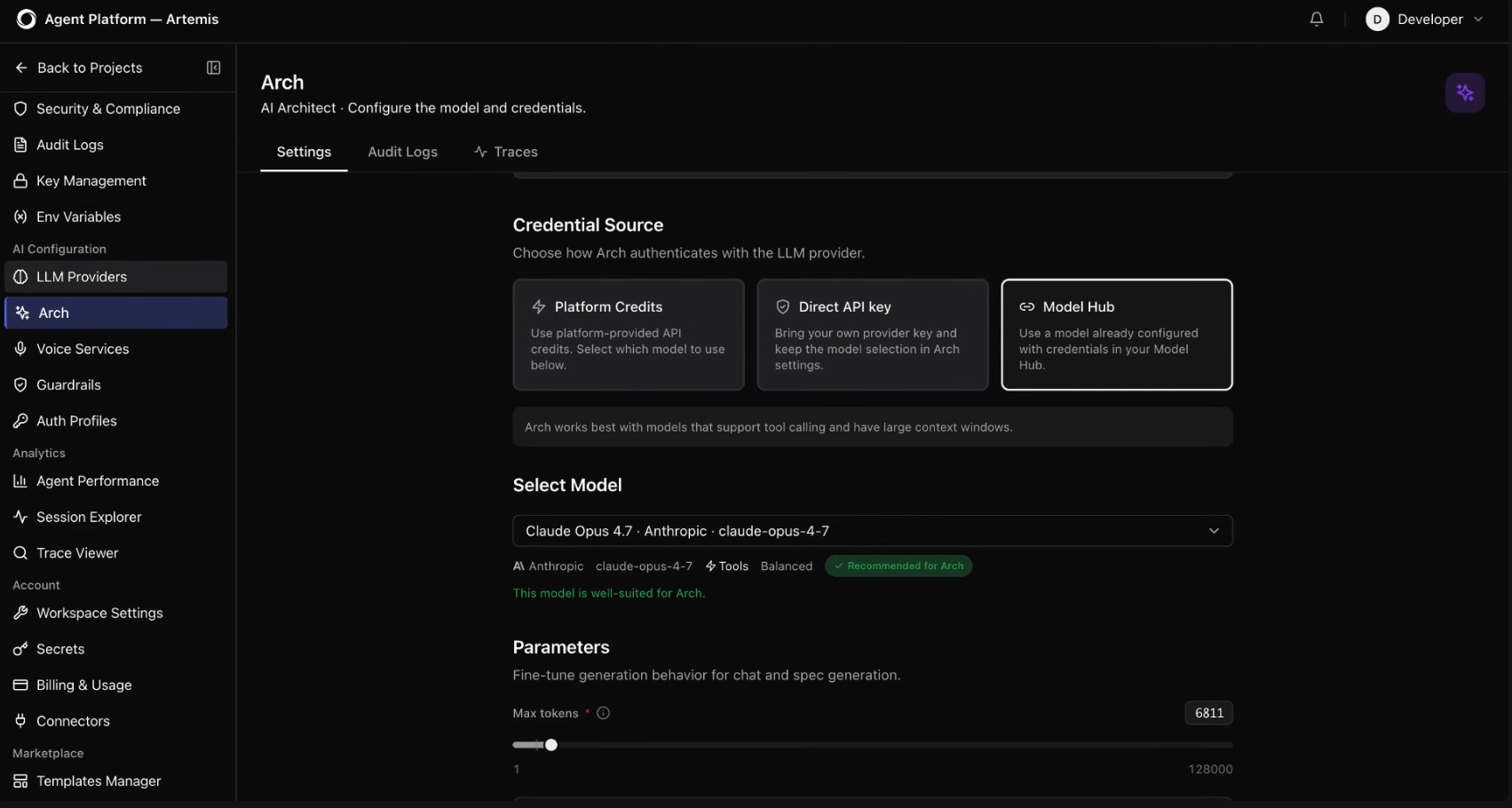
As multi-agent systems grow, manually evaluating the right model for each agent becomes increasingly complex.
Arch, Kore.ai’s AI architect, helps you configure your AI agents. It analyzes an agent project and recommends suitable models for each agent based on what the agent does, how complex the task is, and how much the model will cost to run.
For example, in an AI system featuring a supervisor agent, a product agent, and a leading-question agent, Arch identifies that both the supervisor agent and product agent are performing lightweight tasks and recommends routing them to a more cost-efficient model like Claude Haiku. For the leading question agent, which handles more conversational complexity, Arch recommends using a more capable model, such as Claude Sonnet.
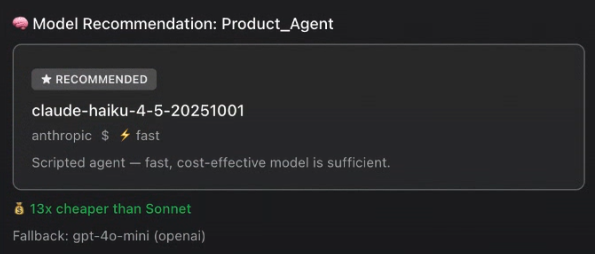
As shown in the image above, Arch provides an explicit cost difference directly in the dashboard: Haiku is 13x cheaper than Sonnet. Arch also recommends a fallback model, GPT-4o mini, for instance, so that if your primary provider goes down, your agents continue functioning without manual intervention.
Before applying any structural updates, Arch displays the exact impact radius (or blast radius), showing you precisely which agents will be affected and how. You get to review the full scope before committing.
4. Observability and performance tracking
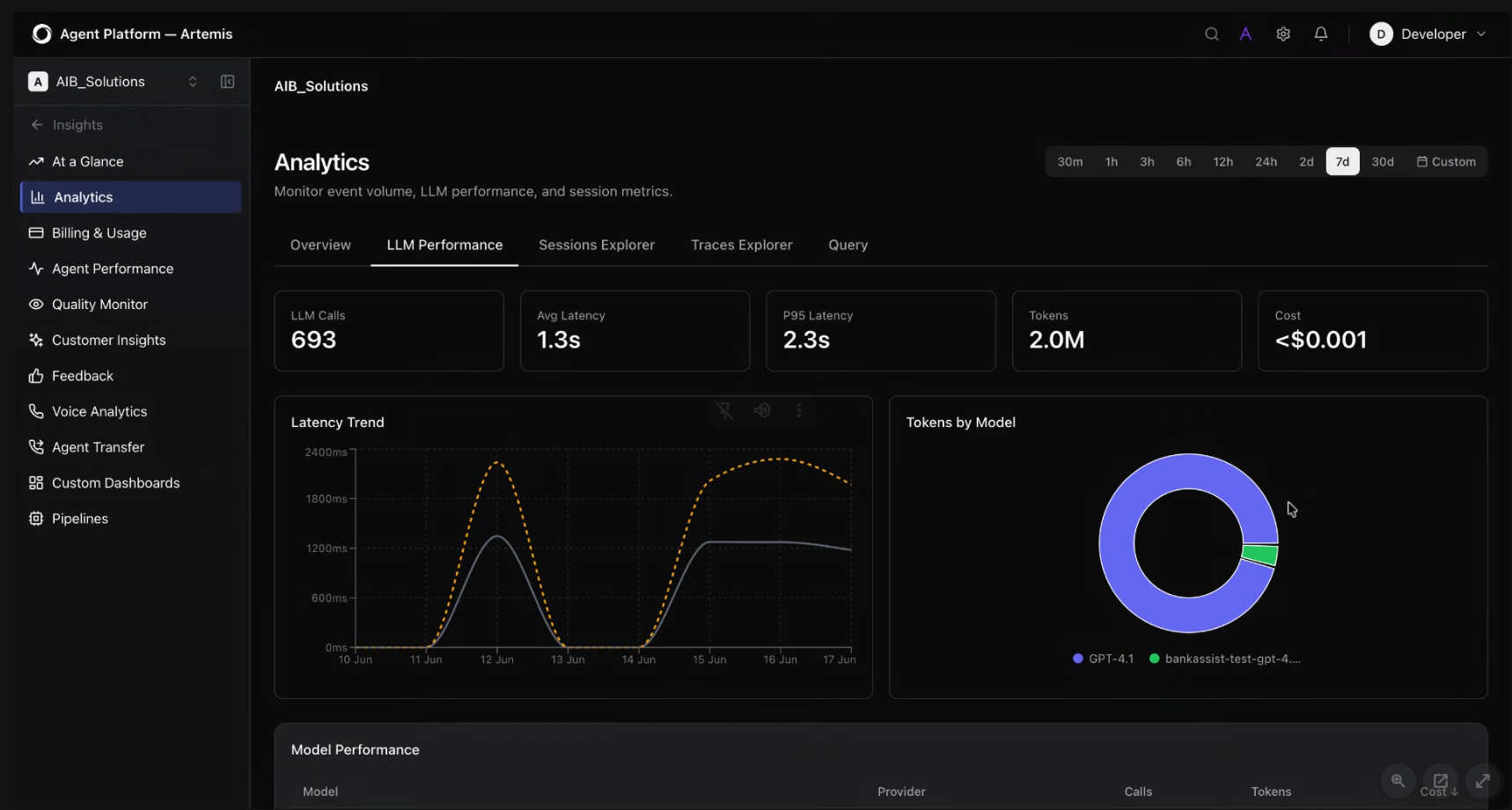
Deploying an optimized setup is a continuous process. Over time, agent architectures evolve, and models that made sense at launch can experience performance drift as token volumes scale.
The Kore.ai Agent Platform’s LLM analytics dashboard provides continuous AI observability:
- Token distribution across your model connections, so you can see exactly which models are being called and how heavily
- Average latency and P95 latency: the response time your slowest 95% of calls are actually experiencing, measured in milliseconds per model.
- Cost and call volume breakdown per model: how many calls were made, how many tokens were consumed, and what it cost.
You can also see where activity is concentrated, whether events are originating at the application layer or the language model layer. Together, this gives you the information you need to validate that your initial model assignments are working, and to see clearly where they aren't.
What a well-configured system looks like in practice
The path from one-model-for-everything to a well-configured multi-model system isn't as complex as it sounds when the platform is doing most of the work.
Once you’ve registered your providers, ask Arch to analyze your agents and return cost-aware model recommendations. Apply those, configure each agent's reasoning, verbosity, compaction, and streaming for its specific job, and set fallback models for continuity. After launch, use the analytics to validate your decisions and adjust as the system grows.
Every agent call, every token, every user interaction runs through the model you chose. Kore.ai's Agent Platform is designed to get it right at the architecture stage.
Ready to see how Kore.ai Agent Platform automates model selection for you? Book a demo
Frequently asked questions
Q1. What is the difference between model selection and model configuration?
Model selection is choosing which LLM an agent uses. Model configuration is how that model behaves for a specific agent, how deeply it reasons, how long its responses are, how much conversation history it carries, and whether it streams output. Both decisions affect cost and performance significantly
Q2. How can enterprises reduce LLM costs without reducing agent quality?
The best starting point is to match model capability to task complexity. Simple tasks such as routing, classification, validation, and sentiment checks can often use fast or lower-cost models. Complex tasks such as reasoning, synthesis, and analysis may justify more powerful models.
Teams can also reduce cost by tuning reasoning effort, limiting unnecessary output length, compacting context, using the right model tier for each operation, and monitoring token usage after deployment.
Q3. Should every agent in a multi-agent system use a different model?
No. The goal is not model diversity for its own sake. The goal is the right fit. Several lightweight agents may use the same fast model or the same configuration. But agents with meaningfully different jobs should have model setups that reflect those differences.
Q4. What is a model smoke test?
A model smoke test is a basic validation step for a model connection. It checks whether the platform can connect to the model, send input, receive output, and measure latency. Teams should run a smoke test when adding a new provider, registering a new model, or preparing to use a new model configuration in an agent.
Q5. Is model selection a one-time decision?
No. Model selection should evolve as usage patterns, agent behavior, model prices, and business needs change.