





.webp)
If you've ever spent time browsing the internet, chances are you've come across an 'FAQ' section - a vital component of a knowledge base. FAQ sections provide answers to the most frequently asked questions posed by customers, proving beneficial to them at every step of their journey. With AI increasing in popularity, organizations are increasingly leveraging intelligent virtual assistants to enhance their knowledge base for better customer service.
However, creating an AI-powered chatbot that can effectively handle FAQs is no small feat - it requires careful planning and training to ensure that the bot can anticipate and answer all of the questions a user may have.
Valuable Benefits of Training Intelligent Virtual Assistants to Address FAQs
Training AI chatbots on FAQs is a crucial element in providing efficient and effective customer service. By anticipating and answering frequently asked questions, intelligent virtual assistants (IVAs) can help users find the information that customers need quickly and easily, reducing frustration and improving the overall user experience.
With the ability to quickly and accurately answer common customer questions, IVAs can also help reduce the workload of live customer support agents and improve overall customer satisfaction. By automating the handling of frequently asked questions, intelligent virtual assistants can also provide 24/7 support, improve response times, and increase the overall efficiency of customer service operations.
You can do this by leveraging your Knowledge Graph Engine to build the FAQ Repository and we’ll discuss the main steps to building this out yourself.
Creating A Knowledge Graph
The Kore.ai XO Platform's Knowledge Graph (KG) helps you take static FAQ text and transform it into an intelligent, personalized conversation. It surpasses the conventional method of just presenting FAQs as straightforward question-answer pairs. The Knowledge Graph enables you to create a hierarchical structure of key terms and associate them with context-specific questions, including their alternative terms, synonyms, and more.
To generate a Knowledge Graph, you need to add FAQs to an existing or new IVA. If you're interested in comparing the two types, see the documentation detailing the Ontology Knowledge Graph and the Few-Shot Knowledge Graph.
You can find the Knowledge Graph in the Knowledge AI section under ‘Conversational Skills’ inside the bot builder. From there, you can get started.
Knowledge Graph Terminology.
Understanding the terminology related to the Knowledge Graph can be tricky, but we've explained some of the terms below for your convenience. Can't find a term you're looking for? Check out the Knowledge Graph Terminology Page.
1. Intent
the objective or goal a user has when engaging in a conversation with a chatbot or intelligent virtual assistant. It's essentially what the user intends to achieve from the conversation, such as booking a flight, making a purchase, or seeking information.
2. Ontology
a set of concepts and categories in a subject area or domain that shows their properties and the relations between them. Another way to look at Ontology is that when we have common topics that fall underneath a certain umbrella, we can add all of those FAQ’s to that umbrella to provide a higher degree of accuracy when we’re receiving FAQ’s from users.
3. Terms or Nodes
the building blocks of an ontology and are used to define the fundamental concepts and categories of a Knowledge Graph.
Root Term/Node: forms the topmost term of your Ontology. A Knowledge Graph contains only one root node, and all other nodes in the ontology become its child nodes. The Root node takes the name of the VA by default, but you can change it as needed.
4. First-level Term/Node
the immediate next-level nodes after the Root node. There can be any number of first-level nodes in a graph. We recommend using first-level nodes to represent high-level terms, such as the names of departments, functionalities, etc. For example, in a Travel Assistant, you might have a first-level node called Reservation, which can be structured by functionality into sub-nodes such as: Cancel and Update.
5. Leaf Term/Node
Any node at any level starting with the 2nd is called a Leaf Term/Node.
Determine Intents
Before you start building your FAQs, it's important to identify which user intents are most beneficial by understanding the main goals your users are aiming to achieve in a customer service interaction. By identifying these goals, you can create FAQs that directly address these intents, enhancing user experience and satisfaction. This approach ensures that your FAQs are not just random questions but strategically designed tools that add value to your users' journey.
The new XO Platform Intent Discovery beta module helps you auto-extract popular intents from previous user conversations. It reduces the time and effort to build a virtual assistant and leads to the success of your Conversational AI Journey. This beta feature is currently only supported in English and is only available for enterprise users.
You can upload your historical transcripts in CSV format. After the transcripts are uploaded into the bot, the bot uses LLMs to identify different topics, intents, or conversations available between the user and the bot. You can review each intent to understand which conversations have resulted in identifying these intents. After the review, you can also see the underline utterances that resulted in identifying an intent. You can either add these intents as new intents for your intelligent virtual assistant or pick specific utterances and train them as utterances for your existing dialogs and FAQs. So, it helps both ways – either create new intents or enhance the training you provide to your virtual assistant.
Creating a Node
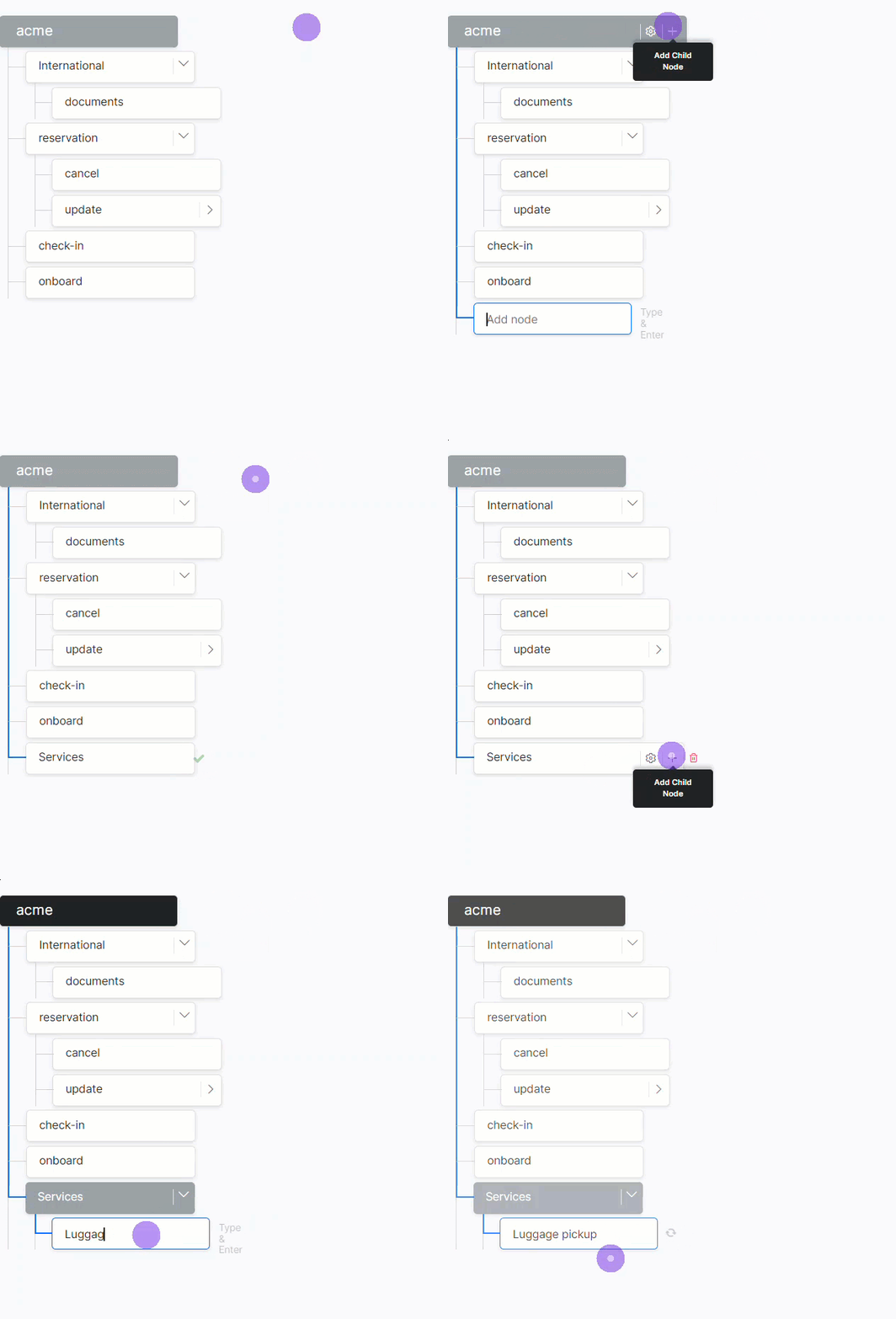
If you are starting from scratch, creating the Knowledge Graph Node Structure is the first step. By default, the name of the IVA becomes the root node of the hierarchy but you can edit this. Create the rest of the nodes below the root node.
To create nodes, follow the below steps:
- Open the Knowledge Graph.
- On the top left of the Knowledge Graph window, hover over the root node.
- Click the + icon. A text box appears below to Add Node.
- Type the name of the node in the text box and press Enter.
- Repeat steps 1 to 3 to create other First-level nodes.
- After you create First-level nodes, create child nodes as follows:
- Hover over any First-level node, and click the plus icon to create its child node.
- You can create a child node for any level node by hovering over it and clicking the + icon.
Follow the same process to create multiple node levels.
The next step is to add Knowledge Graph Intents which can be either:
- FAQ – to answer user queries
- Task – to execute a dialog task.
*Note: For better performance, there is a restriction of 50k FAQs spread across 20k maximum allowed number of nodes.
Adding FAQs
To add an FAQ, follow the below steps:
1. On the left pane of the Knowledge Graph window, click the node to which you want to add questions.
2. Click Add Intent on the top-right.
3. On the Intent window, under the Intent section, select FAQ.
4. Optionally, enter a Display Name. This name will be used for presenting the FAQ to the end-users.
5. In the Add Question field, enter the question that describes the user’s query.
6. Optionally, if there are alternatives to the same question, add them in the Add Alternate FAQ field. Repeat the step for all the alternative questions you want to add.
7. You can use patterns to define the FAQs. This can be done by preceding the pattern with || (two vertical bars) in the alternate question field. The Platform marks these as patterns and evaluates them accordingly (see here for more on patterns).
8. For each question, you can add terms that will serve as tags in better identifying the question by the Knowledge Graph Engine.
7. You can set the Intent Status as enabled or disabled for the FAQ intents. The Knowledge Graph will not use the FAQs intents that are in the enabled state. These intents will not participate in the intent recognition process during testing and end-user interaction.
8. You can also set Term Status as enabled or disabled. The Knowledge Graph will only use the terms that are in the enabled state. The terms marked as disabled and all their FAQ intents do not participate in the intent recognition process during testing and end-user interaction.
9. You can also add a Reference Id. This field can be used to add a reference to any external content used as a source for this FAQ.
10. As you enter these questions, pay attention to terms that you can further add to your FAQ hierarchy.
Manage Bot Responses
For the intelligent virtual assistant response, you can compose simple or complex channel-specific replies.
- Standard: The prompt defined when adding a node in Dialog Builder is the standard or default prompt. When multiple standard prompts are defined for a node, the Platform chooses a random one to display to the end-user.
- Channel-Specific: Use prompts can be defined for specific channels such as email, SMS, Twitter, and more. By varying the responses, you can make the language and formatting leverage the strengths of the selected channels. To add a channel-specific response, select the channel from the channels list before typing the response.
You can use either a basic or advanced editor to edit responses, refer to the guide here for more on user prompts.
*Note: We recommend you add one response for All Channels so that it can be used in the absence of a channel-specific response.
Sometimes the responses to the FAQ are quite lengthy or may include nice-to-have information along with the primary response. To improve the readability of such responses, you can split information into multiple responses that go as separate messages one after another by clicking Add Extended Response on the top-right of the Bot Response window.
Optionally, you can use Add Alternate Response if your question can have more than one answer. Repeat the step for all the alternative responses you want to add. At runtime, the platform will pick one response at random.
You can learn more about managing FAQs here.
Execute Dialog Tasks
You can link a dialog task to a Knowledge Graph Intent. It helps you to leverage the capabilities of the Knowledge Graph and dialog tasks to handle FAQs that involve complex conversations.
- On the Intent window, under the Intent section, select Task.
- Optionally, enter a Display Name. This name will be used for presenting the FAQ to the end-users in case of ambiguity.
- Select a task from the drop-down list. You can Add Utterance that triggers this task.
- If multiple utterances mean the same, Add Alternate Utterance.
- You can also add a Reference Id. This field can be used to add a reference to any external content used as a source for this FAQ.
- Click Save.
Improving Knowledge Graph Performance
The Knowledge Graph engine works well with the default settings, but you can fine-tune the KG engine performance.
Here are a few guidelines:
- Configure the Knowledge Graph by defining terms, synonyms, primary and alternative questions, or user utterances. Though hierarchy does not affect the KG engine performance, it does help organize and guide your knowledge implementation.
- Set the following parameters:
- Path Coverage – For Ontology-based graphs, you can define the minimum percentage of terms in the user’s utterance to be present in a path to qualify it for further scoring.
- Definite Score for KG – Define the minimum score for a KG intent match to consider as a definite match and discard any other intent matches found.
- Minimum and Definitive Level for Knowledge Tasks – Define minimum and definitive threshold to identify and respond in case of a knowledge task.
- KG Suggestions Count – Define the maximum number of KG/FAQ suggestions to present when a definite KG intent match is unavailable.
- The proximity of Suggested Matches – Define the maximum difference to allow between top-scoring and immediate next suggested questions to consider as equally important.
- Qualify Contextual Paths – This ensures that the bot context is populated and retained with the terms/nodes of the matched intent. This further enhances the user experience.
*Note: You can customize these settings in Natural Language > Thresholds & Configurations.
- Traits – Traits qualify nodes/terms even if the user utterance does not contain the term/node. Traits are also helpful in filtering the suggested intent list.
Tips for Building a Knowledge Graph
From the Knowledge Graph, follow these steps to build and train the corresponding Knowledge Graph:
- Identify terms by grouping the unique words in each FAQ question. Build a hierarchy based on all such unique words.
- Ensure that each node has not more than 25 questions.
- Associate traits with terms to enable filtering FAQs from multiple identified results.
- Define synonyms for each term/node in the hierarchy. Ensure that all the different ways to call the term are defined.
- Depending on the importance of each term in a path, mark them as either mandatory or regular.
- Define alternative questions for each FAQ to ensure better coverage.
- Manage context for accurate response.
- Use Stop Words to filter unwanted utterances.
To continue improving your Knowledge Graph engine, see our step-by-step process for Knowledge Graph Training for more details on fine-tuning your intelligent virtual assistant.