AI for Work inside Microsoft 365: how Kore.ai and Microsoft are redefining enterprise productivity
Last Updated
September 29, 2026
.jpeg)
Meghana Chintalapudi
Read Time
Summary
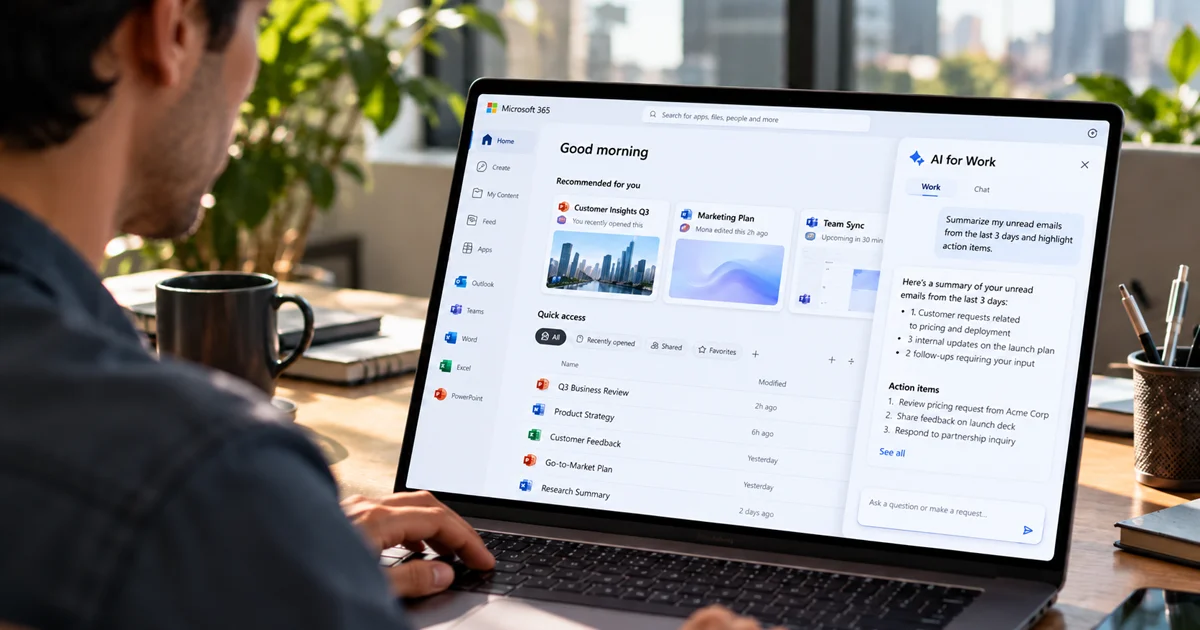
Work is often fragmented across email, collaboration tools, knowledge bases, and business applications. This blog explains how AI for Work integrates with Microsoft 365 Copilot to bring enterprise search, orchestration, persistent memory, and pre-built agents directly into Teams, Word, Excel, Outlook, and Copilot Chat. It shows how employees can find information and complete cross-system workflows without leaving the Microsoft 365 experience.
What’s on this page
Work today is fragmented across more systems than any one person should have to manage. A simple customer escalation starts as an email, gets logged in a ticketing system, tracked in a project tool, researched across multiple knowledge bases and then communicated as an update in a messaging app. The same business context, duplicated manually across every tool.
Employees are not doing less work. They are doing the same work five times over, just in five different places.
This is what enterprise productivity looks like when fragmentation goes unchecked, and it is exactly what AI for Work was built to fix.
The productivity problem AI for Work was built to solve
The fragmentation employees experience is a compounding operational cost that quietly drains organizations at scale, and it shows up in four distinct ways.
1. Too many tools with no unified experience
Roughly 50% of businesses run on 17 or more standalone work tech solutions, forcing constant context switching and duplicate work.
2. No single place of truth
Employees spend 20 to 30% of their time hunting through SharePoint sites, Slack threads, and emails to find a single piece of information.
3. Support queues that never clear
Routine requests pile up faster than teams can resolve them, costing businesses $322 billion globally in productivity friction and employee burnout.
4. Too much time lost to repetitive work
Nearly 40% of employee time goes to automatable tasks like data entry, report generation, and status updates, leaving little room for meaningful work.
In short, the tools meant to support work have become the work itself.
AI for Work fixes this by giving every employee a single intelligent layer that connects to all their enterprise systems, letting them search, act, and trigger multi-step workflows from one place, without losing context.
Five accelerators, each built for the leader who owns the problem
AI for Work is not a general-purpose assistant. It ships with five purpose-built accelerators, each designed around the workflows of a specific function, so the people closest to the problem see value from day one without a long implementation runway.
AI for HR
Covers the full employee lifecycle: onboarding with Day 1 agendas and buddy assignment, benefits exploration, leave management with dynamic policy adoption, compensation and pay slip access, performance goal management, background verification document processing, engagement surveys, award nominations, and offboarding. The CHRO does not need to spend time building these use cases. They are live on day one, connected to the existing HRIS stack.
AI for IT
Handles the full helpdesk workflow: incident creation and resolution, endpoint remediation automations, password resets and account unlocks, knowledge search, ticket auto-assignment with business rules, outage management, and application health checks. Support teams stop drowning in queues and start resolving issues at a pace that matches demand.
AI for Recruiting
Compresses time-to-hire at every stage: automated requisition creation, career page chatbot deployable on SAP and Oracle pages, AI resume filtering with explainability, automated screening via Teams or IVR, low-touch interview scheduling, structured feedback management with bias detection, and recruiter analytics across internal and external candidate pools. Everything a Head of Talent Acquisition needs, without building from scratch.
AI for Sales
Covers every stage of the revenue pipeline: lead scoring and research dossiers for business development representatives, transcript summaries and CRM auto-updates for account executives, proposal and request for proposal (RFP) generation for late-stage deals, and pipeline forecasting and deal risk alerts for sales managers. Five hours a week back per rep, across a 1,000-rep organization, translates to roughly $18 million a year in recovered capacity at ten times Year 1 ROI.
AI for Engineering
Covers the full development cycle from PRD to production: product requirements documentation (PRD) generation and sprint planning for PMs, coding assistance and documentation for engineers, PR review and compliance for tech leads, test case generation and regression curation for quality assurance (QA), deployment checklists for release engineers, and incident triage and routing for SREs. Four hours a week back per R&D headcount, $7 million a year at four times Year 1 ROI for a 2,000-person engineering organization.
General productivity foundation
On top of all five accelerators sits a general productivity foundation available to every employee, regardless of function. A morning brief surfaces priority emails, upcoming meetings, and open tasks before the day begins. Pre-meeting and post-meeting agents prepare context and capture follow-ups automatically. And cross-application enterprise search retrieves answers across every connected system, not just what lives in Microsoft 365 but across Jira, Salesforce, ServiceNow, SharePoint, Slack, and 100+ other sources, in a single query from a single place.
But there was still one problem
AI for Work solved the fragmentation problem, but introduced a new one. Employees already spend the majority of their working day in Microsoft 365. They live in Teams for communication, Word for documents, Outlook for email, and Excel for analysis. Asking them to open yet another application means asking them to leave the interface where they already work. That friction, however small, is enough to kill adoption.
The question stopped being whether we can make employees more productive and became whether we can meet them exactly where they already are.
The answer: AI for Work inside Microsoft 365
The answer is the AI for Work and Microsoft 365 Copilot integration. AI for Work is integrated as a Custom Engine Agent (CEA) inside the Microsoft ecosystem, which means it is not a separate tab, a new login, or another tool to onboard. It surfaces directly inside Teams, Copilot Chat, Word, Excel, and Outlook, right where employees already spend their day.
Employees get AI for Work's advanced orchestration, long-term memory, and enterprise connectivity delivered through the Microsoft interface they already know.
Under the hood: how AI for Work integrates with Microsoft 365
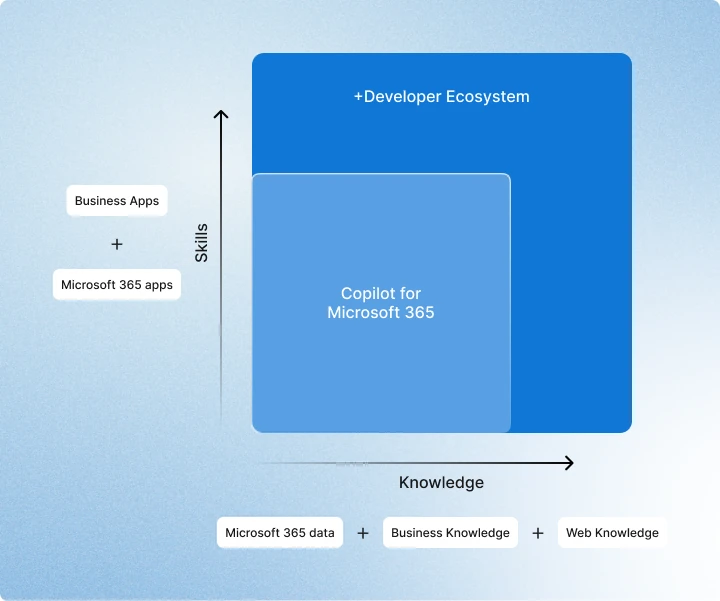
Beyond Microsoft 365 Copilot's native data and skills, it exposes an extensibility layer that lets enterprises bring in custom knowledge, skills, and orchestrators layered on top of the Copilot interface employees already use. AI for Work plugs into that extensibility layer as a Custom Engine Agent (CEA).
What is a Custom Engine Agent?
Custom Engine Agents are specialized Copilot agents designed to meet specific enterprise scenarios. Unlike declarative agents, they give developers the flexibility to bring their own orchestration and AI services. Custom Engine Agents are characterized by three things:
1. A custom AI model orchestrator
2. Advanced Microsoft Teams integration
3. Proactive notifications and asynchronous messaging capabilities
The anatomy of the integration
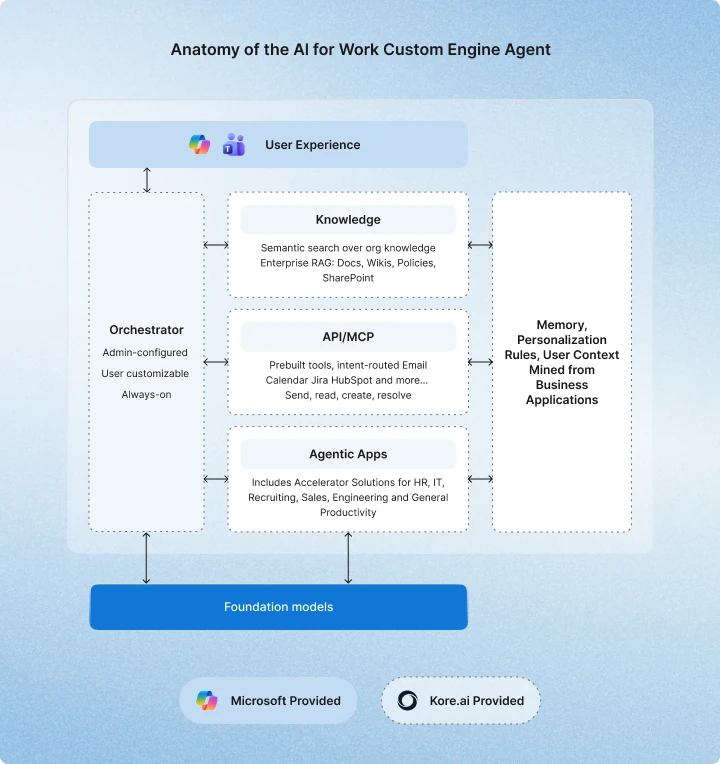
At the user experience layer, employees interact through Microsoft Teams and Copilot Chat.
The Kore.ai orchestrator sits at the center, admin-configured, user-customizable, and always on. When a request comes in, it routes to a knowledge retrieval layer, an API or MCP action, or a specialist agentic app, based on intent, context, and smart weighting rules. If a file has been added to the conversation, the orchestrator prioritizes file context but keeps API tools and search active as fallback. If a specific agent has been selected, it routes with preference to that agent while base MCP tools remain available.
The knowledge layer handles semantic search across the organization's full knowledge graph: docs, wikis, policies, SharePoint, and 100+ line-of-business systems via agentic RAG.
The API and MCP layer provides pre-built, intent-routed tools for email, calendar, Jira, HubSpot, and more, enabling the agent to send, read, create, and resolve actions across systems in a single turn.
The agentic apps layer is where the accelerator solutions live, HR, IT, Recruiting, Sales, Engineering, and general productivity, each with their own workflows and integrations.
Running alongside all of this is a persistent memory and personalization layer. Context is continuously mined from the business applications the user has connected, building a profile of role, preferences, active projects, and working style that makes every subsequent interaction more precise. Requests are understood correctly and routed to the right agent or data source without the user having to re-explain themselves.
All of it runs on foundation models at the base, with Microsoft providing the user experience surface.
Better together: what the integration actually unlocks
Microsoft 365 Copilot and AI for Work each solve different parts of the enterprise productivity problem. Together, they close the gap entirely.
Ready-to-deploy solutions for every department. Microsoft's admin center gives IT precise deployment control at the org, group, and individual user level. AI for Work brings pre-built accelerators for HR, IT, Recruiting, Sales, and Engineering ready to roll out department by department, with value realized from day one rather than waiting on long custom build cycles.
One interface, every channel. Microsoft 365 Copilot provides a unified interface across Microsoft 365 apps. AI for Work meets employees wherever they actually work, Copilot Chat, Teams, Slack, mobile, or via SDK. The result: Kore.ai's agents are invokable directly inside Excel, PowerPoint, Word, and Outlook without ever leaving the Microsoft experience.
Enterprise search across every connected system. Microsoft's Graph connectors cover Microsoft 365 data well across Outlook, Teams, SharePoint, and OneDrive. AI for Work extends that reach across 100+ line-of-business systems with context-aware agentic RAG, multi-vector search, layout-aware chunking, and teachable retrieval. If an existing enterprise search solution like Coveo or Amazon Q is already in place, it plugs in via Kore.ai's extensibility layer rather than having to be replaced.
Personalized memory across every session. Copilot users can store custom instructions and chat history for personalization. AI for Work goes further, extracting long-term context from agent conversations and connected business systems, building a memory profile that is hierarchical, cross-agent, and configurable. Every session starts smarter than the last.
Routing and escalation, always in control. Microsoft's Agent Recommendations surface the right agent for a task from the Copilot Chat surface. AI for Work adds configurable handoff rules, escalation paths, and human-in-the-loop triggers across multi-agent scenarios, giving enterprises precise control over when AI acts autonomously and when a human needs to step in.
Agent governance that scales without sacrificing autonomy. Microsoft's Agent Registry gives IT a central view of the full agent lifecycle across the tenant. AI for Work lets HR, Sales, and individual employees build and manage their own agents in scoped workspaces, each with their own token controls, analytics, and lifecycle management. Microsoft's registry rolls all of it up into a single pane of glass, so teams move fast without IT losing control.
Security and observability, built in. Agent365, Kore.ai’s governance and observability layer, extends Microsoft's native security and compliance framework, registry, access control, and Entra ID integration, with Kore.ai's full observability layer: audit trails, policy enforcement, and security boundaries. Kore.ai agents gain Entra identity and are governed like human users, with telemetry flowing into Agent365 for unified visibility.
From reactive assistant to proactive teammate. Today's AI assistants respond when asked. AI for Work's context graph, backed by the Work Project, enables the assistant to understand the full scope of a user's active work and proactively surface relevant actions, blockers, and next steps before they are asked. Agents operate with their own Teams profile and email identity, functioning as genuine teammates rather than tools. (Coming soon)
The bottom line
Microsoft 365 is where work happens. AI for Work is how work gets done smarter, with accelerator solutions purpose-built for HR, IT, Recruiting, Sales, and Engineering, delivered inside the Microsoft interface your employees already live in.
That means context-aware search across every enterprise system, agents that remember who you are and how you work, and multi-agent workflows that run, route, and escalate without manual intervention. Pre-built solutions that go live in days, not months.
All of it, inside Teams, Word, Excel, PowerPoint, Outlook, and Copilot.
Get started today:
AI for Work in Teams App Store
Share
Tags