How to build AI agents from scratch in 2026 (no coding required)
Last Updated
May 22, 2026

Gaurav Bhandari
Read Time
Summary
Building an AI agent is easy, but making it enterprise ready is not. Production agents need real system access, governance, and observability, not just a working prototype. There are four ways to build one: custom code, open source frameworks, cloud services, or an enterprise agent platform, but only platforms give you the full production stack out of the box. Getting the agent built is step one. What determines success is how well you monitor, govern, and improve it afterward.
What’s on this page
Here's the step-by-step guide to building production-ready AI agents in 2026, without writing a single line of code.
Key takeaways (The TL;DR)
- Building AI agents is easy. Making them enterprise-ready is not. Production-ready agents must be connected to real systems, governed properly, observable, and reliable at scale.
- There are 4 ways to build AI agents: Custom code, OSS frameworks, cloud services, and enterprise agent platforms. But only agent platforms provide the full production stack.
- Building an agent is step one. What determines long-term success is how well you can monitor, govern, and improve it in production.
Building an AI agent has never been easier. You can open an AI coding tool, describe what you want, and get a working prototype in an afternoon. You can use open-source frameworks to connect an LLM to tools, add memory, call APIs, and even create a basic interface.
So if building AI agents is this accessible, why are so many enterprises still struggling to get them into production?
By the end of this guide, you’ll know why. And you’ll have a clear step-by-step process on how to build AI agents that are production-ready and fit to run inside your enterprise workflows.
Why building enterprise AI agents is harder than it looks
Building a basic AI agent and building an enterprise-ready agentic system are two completely different problems. Sure, a basic AI agent can answer questions, use tools, or complete simple tasks. But the moment you try connecting the same agent to real systems, with real users, following real policies, the gaps show up fast.
Here’s what enterprise AI agents actually need:
1. Business context
An enterprise AI agent needs to understand how your business works. For instance, a customer service AI agent should know your return policy, refund rules, shipping timelines, escalation process, loyalty benefits, cancellation terms, and product-specific exceptions.
Without that context, the agent may sound helpful but still give the wrong answer. And in an enterprise, a wrong answer can create compliance issues, customer dissatisfaction, revenue leakage, or extra work for support teams.
2. Enterprise data access
Enterprise AI agents need to integrate to real systems. CRMs, ERPs, ticketing platforms, order management systems, knowledge bases, payment systems, HR systems, and internal data stores such as your company database.
They need access to systems your business runs on, with the right authentication, the right permissions, and without creating security vulnerabilities in the process.
3. Tool use and action-taking
This is the biggest difference between an AI agent and an FAQ chatbot. Answering a question is the easy part. Taking action is what makes an agent genuinely useful.
An enterprise AI agent can initiate a refund, update a customer record, cancel an order, update the CRM, and more.
But it also makes them riskier. They need to do it correctly, every time, within defined boundaries. The action-taking capability, the AI agent orchestration layer that coordinates it, and the safeguards around it all need to be built and tested with care.
4. Governance
Governance is something that enterprises cannot ignore. An enterprise AI agent needs guardrails. It needs to know what topics are off-limits, what data should be redacted, which actions require human approval, and when it should stop and escalate.
Enterprises need role-based access controls, configurable guardrails, content safety filters, PII handling, and a complete audit trail of every decision the agent makes. Without governance, an AI agent can quickly become a liability.
5. Human handoff
AI agents should not try to handle everything. The best enterprise agents know their limits, and when a situation exceeds those limits, they must pass the conversation to a human.
For example, if a customer demands a refund outside the standard return window, the agent should not negotiate, offer exceptions, or make decisions beyond its authority. It should collect the context, acknowledge the situation, and hand the conversation to a human who can make that call.
Designing when and how human handoff takes place is one of the most important decisions in the whole build.
6. Observability
Once your AI agents are live, you need to know how they are performing. Is it using the right knowledge? Are customers dropping off? Are guardrails being triggered? Is the agent hallucinating? Is it costing more than expected?
This is where observability comes in. You need dashboards, session-level traces, quality scores, escalation trends, tool call logs, knowledge gaps, guardrail triggers, cost per conversion, and performance metrics.
All these requirements have to be designed, built, tested, and maintained. And that's exactly what makes enterprise AI agent deployment genuinely complex, regardless of how easy the initial prototype felt.
Analyzed: The 4 main ways to build AI agents
Now that you know what goes into building a genuine AI agent that can sit in enterprise workflows, there are four main routes you can take to build them.
Each route has its place. The right approach to AI agent development depends on what you are trying to build, how technical your team is, how much control you need, and how quickly you want to start getting value.
Route 1 - Build AI agents with custom code (Cursor or Claude code)
If you need to build custom AI agents, coding agents tools like Cursor or Claude Code are the most direct route. You can use them to describe what you want, and you can have a running agent faster than ever.
With this route, you get complete control over every aspect of the agent's behaviour. No platform constraints, no vendor dependency, no abstraction layer between you and what the agent actually does.
But here you are not just building the agent. You are also building everything around — the orchestration layer, the security model, the integration connectors, the testing pipeline, the governance framework, the monitoring tooling, and the deployment infrastructure from scratch.
And then there's a second problem: every team builds differently. Product managers, operations leads, and business analysts with no development background are spinning up agents using AI coding tools. When multiple teams across your organization each build their own agents their own way, you end up with agent sprawl. These agents can't be governed consistently and become progressively harder to audit or update.
Pros:
- Full control over architecture
- Useful for experiments and highly custom use cases
- No vendor dependency
Cons:
- Requires strong engineering resources
- Slower to move from prototype to production
- Agents with no architectural knowledge can fail in production
- Governance, testing, monitoring, and deployment must be built separately
- Harder for non-technical teams to contribute
- Maintenance can become expensive as the agent grows
Best for:
Small technical teams building highly custom AI agents where full control matters.
Route 2 - Build AI agents with open-source frameworks (Langgraph, CrewAI, or Autogen)
Open-source agent frameworks give you a structured way to build agents. Instead of starting from a blank file, you get primitives for orchestration, memory, tool calling, and multi-agent workflows.
This can be a strong option for developer-led teams who don't want to start from scratch.
However, OSS frameworks do not automatically solve the enterprise problem. While frameworks give you the building blocks, they don't give you a production-ready enterprise system.
All the enterprise challenges we outlined earlier? They still remain. You still need to figure out how to:
- Integrate enterprise systems securely
- Manage access controls and permissions
- Test agent behaviour at scale
- Prevent hallucinations
- Handle human escalation gracefully
- Manage compliance and auditability
Each of these becomes an engineering project in its own right.
And as you start scaling, you may find yourself rebuilding significant portions of infrastructure you already built, because what held up in a prototype starts buckling under a real multi-agent, multi-channel deployment.
Pros:
- More structure than starting from scratch
- Flexible and extensible
- Strong developer community
Cons:
- Requires engineering expertise
- Governance and observability not included
- Enterprise integrations need custom work
- Production deployment can be complex
- Non-technical teams can’t use or maintain it
Best for:
Engineering-led organizations with the resources to build and maintain the surrounding infrastructure themselves.
Route 3 - Build AI agents with cloud provider AI services (AWS, Azure, and Google)
Major cloud providers have all launched managed AI agent services. If your organization is already deeply invested in one cloud ecosystem, these services offer a degree of out-of-the-box infrastructure.
However, to build a complete enterprise AI agent, you may still need to stitch together multiple services: model endpoints, vector databases, workflow tools, serverless compute functions like Cloud Run, storage layers like Cloud Storage, workflow tools, monitoring, identity, data pipelines, application logic, and front-end channels. And if your enterprise workflows span multiple cloud environments, things get complicated fast.
Pros:
- Strong fit for organizations already using AWS, Azure, or Google Cloud
- Good security and infrastructure capabilities
- Scales well for technical teams
- Can integrate with existing cloud-native services
- Useful when the organization wants cloud-first control
Cons:
- Can require significant technical setup
- Often involves stitching multiple services together
- Business users may not be able to build or modify agents easily
- Multi-channel deployment and governance may need additional work
- Costs and architecture can become complex over time
- Lack of industry-specific prebuilt deep integrations
- No domain-specific applications or support
Best for:
Organizations already deep in a single cloud ecosystem and have mature cloud engineering capacity to build the workflow and governance layers themselves.
Route 4 - Build AI agents with Enterprise Agent Platforms (Kore.ai)
The fourth route is to use a purpose-built AI agent platform. Enterprise agent platforms, like Kore.ai, are built specifically for deploying agentic systems in production enterprise environments. They give you orchestration, integrations, governance, observability, and multi-channel deployment, everything needed to run agentic workflows reliably at scale, all in one place.
The biggest benefit of using an agent platform is that it not just help you create the agent, but it also gives you the surrounding environment to manage the agent properly. Multi-agent orchestration, pre-built enterprise integrations, guardrails, audit logs, channel deployment, and analytics come as part of the platform.
The only real limitation is that you’re accepting some degree of vendor dependency. But if the enterprise agent platform is model-, data-, and cloud-agnostic, that too vanishes quickly.
Pros:
- Fastest path from idea to working agent
- Easier for business and technical teams to collaborate
- Built-in support for agent architecture, tools, knowledge, channels, testing, governance, and analytics
- Better fit for customer service, employee support, and operational workflows
- Reduces the amount of infrastructure teams need to build and maintain themselves
Cons:
- Less control than building everything from scratch
- Teams still need to configure business rules, endpoints, and credentials
- Some degree of Vendor dependency
- Initial learning curve
Best for:
Enterprises that want to operationalize AI agents across real business workflows without building every layer of agent infrastructure themselves.
You can learn here about the 7 Best Agent Platforms in 2026.
Which AI agent building approach is right for your enterprise?
If your team has strong engineering capability and, crucially, time, then building with custom code or an open-source framework is a perfectly reasonable starting point. Just remember, you're not just building the agent. You're building everything around it, too. And as usage grows and complexity compounds, so does the engineering burden.
Cloud provider services reduce the infrastructure overhead, particularly if your organization is already standardized on AWS, Azure, or Google Cloud. But you're trading flexibility for ecosystem lock-in, and complex enterprise workflows still require significant stitching across services. If your agents need to work across systems that span multiple clouds, you'll feel that dependency.
This is where Agent platforms stands out. Agent platforms gives enterprises a way to build AI agents and scale workflow automation without having to create every layer of the agent ecosystem from scratch. The orchestration is already there. The enterprise integrations are already there. The governance controls, the audit trails, the guardrails, the multi-channel deployment framework, all of it comes with the platform.
You simply start with a use case, describe it to the agent platform in plain language, and it takes you from concept to code, designing the entire multi-agent architecture, building the agents, mapping the integrations, and getting you to a deployable system in hours, not months.
How to build AI agents from scratch: Step-by-step guide
By now, you’ve either decided that you’re creating AI agents yourself or you’re working with an AI agent platform. The following guide is for teams that want to build and deploy production-ready AI agents without building every layer of infrastructure themselves.
So if you’re building AI agents and the infrastructure around it yourself, we wish you luck and bid farewell. For everyone else, you can watch this step-by-step video walkthrough or keep scrolling. 👇
Step 1 - Start with the use case you want to build AI agents for
Before you get into architecture, integrations, guardrails, or deployment, start with one simple question: What do you want this AI agent to actually do?
There are hundreds of enterprise use cases you can build AI agents for. Whatever your use case is, having clarity helps you define what the agent should do, what it should not do, what success looks like, which systems it needs access to, which channels it should work on, and when it should hand off to a human.
Once you've locked in your use case, simply head over to Kore.ai Agent Platform and click on “New Project.”
Step 2 - Discuss your use case with ARCH
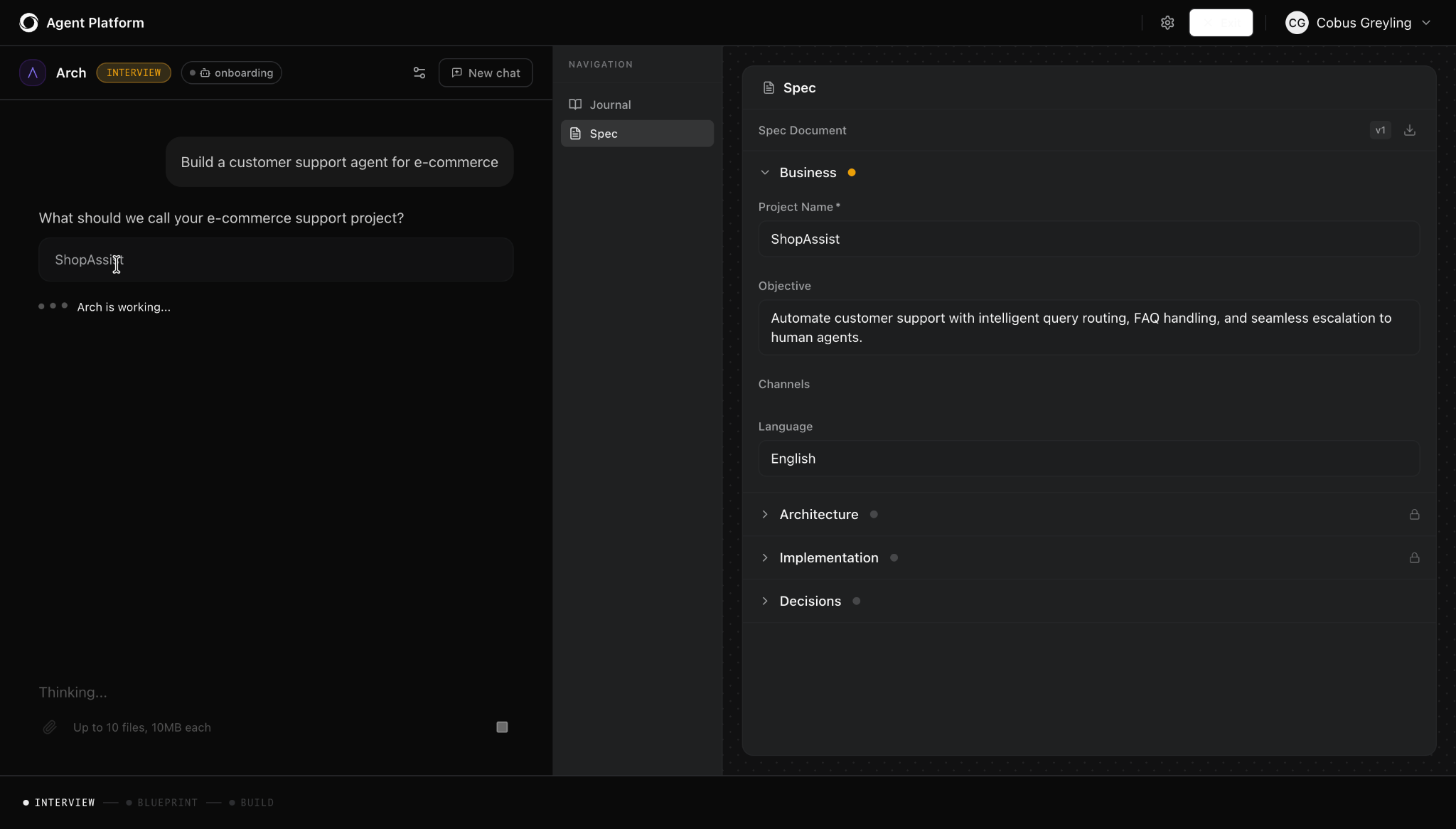
When you create a new project, you'll see three starting options: pick an industry template, start from a blank canvas using the platform's visual builder, or build with Arch. Click on “Start with Arch.”
ARCH is Kore.ai’s AI-powered architect that helps you build AI agents faster. by designing the agent architecture, writing the code, and refining agents. It translates your requirements into Agent Blueprint Language (ABL) that defines how your agents think, act, and follow rules — without you having to write a single line of it yourself.
This means, instead of asking you to write any code, Arch uses natural language processing (NLP) to let you describe what you want in plain English. For instance, type something like: "Build customer support agents for an ecommerce store." Or if you already have standard operating procedures, policy documents, or workflow guides, you can upload them directly to Arch at the start.
Once you’ve uploaded the SOPs or told what you want to build, Arch takes it from there. It asks you a handful of follow-up questions:
- What do you want to call it?
- Which channels should it work on?
- What customer support tasks should it handle?
- What's the primary language?
Arch automatically identifies your business requirements, recognizes the agent patterns your workflows need, and captures the key logic, without you having to describe anything manually. Along the way, Arch also offers suggestions to help you make better design decisions.
Once Arch has enough information, it tells you: “I have enough information. What would you like me to do?”
Click on “Design the architecture.”
Step 3 - Let Arch create the agent architecture
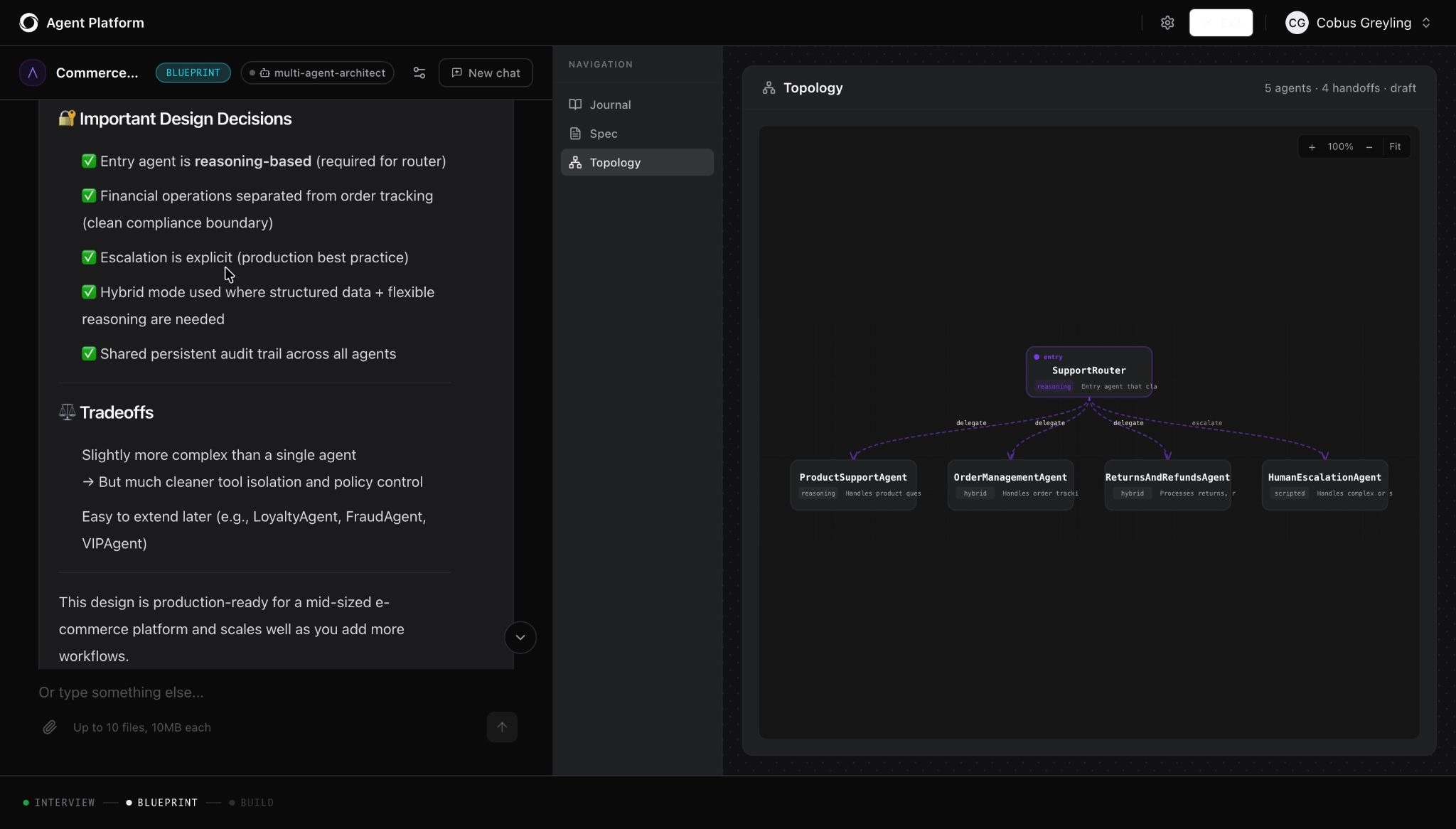
This is where it gets interesting. Arch does not just create a single agent. It designs an entire multi-agent system — a topology where each agent has a specific job. You'll also see a visual architecture map appear on your screen.
For instance, in our customer service agent example, Arch created an architecture with six agents:
- Support Router - receives every incoming conversation and decides where to send it
- Orders Agent - tracks and retrieves order information
- Returns Agent - guides customers through the return process
- Refunds Agent - handles refund requests and eligibility checks
- Product Agent - answers product-related questions
- Human Escalation Agent - detects when a human is needed and hands off with full context
Arch also provides the reasoning why this architecture makes sense, what each agent’s role is, and whether each one uses a flow-based approach (deterministic, rule-following) or a reasoning-based approach (flexible, judgment-driven). Some agents are hybrid. Arch makes these calls based on the nature of each task.
Step 4 - Review and build AI agents
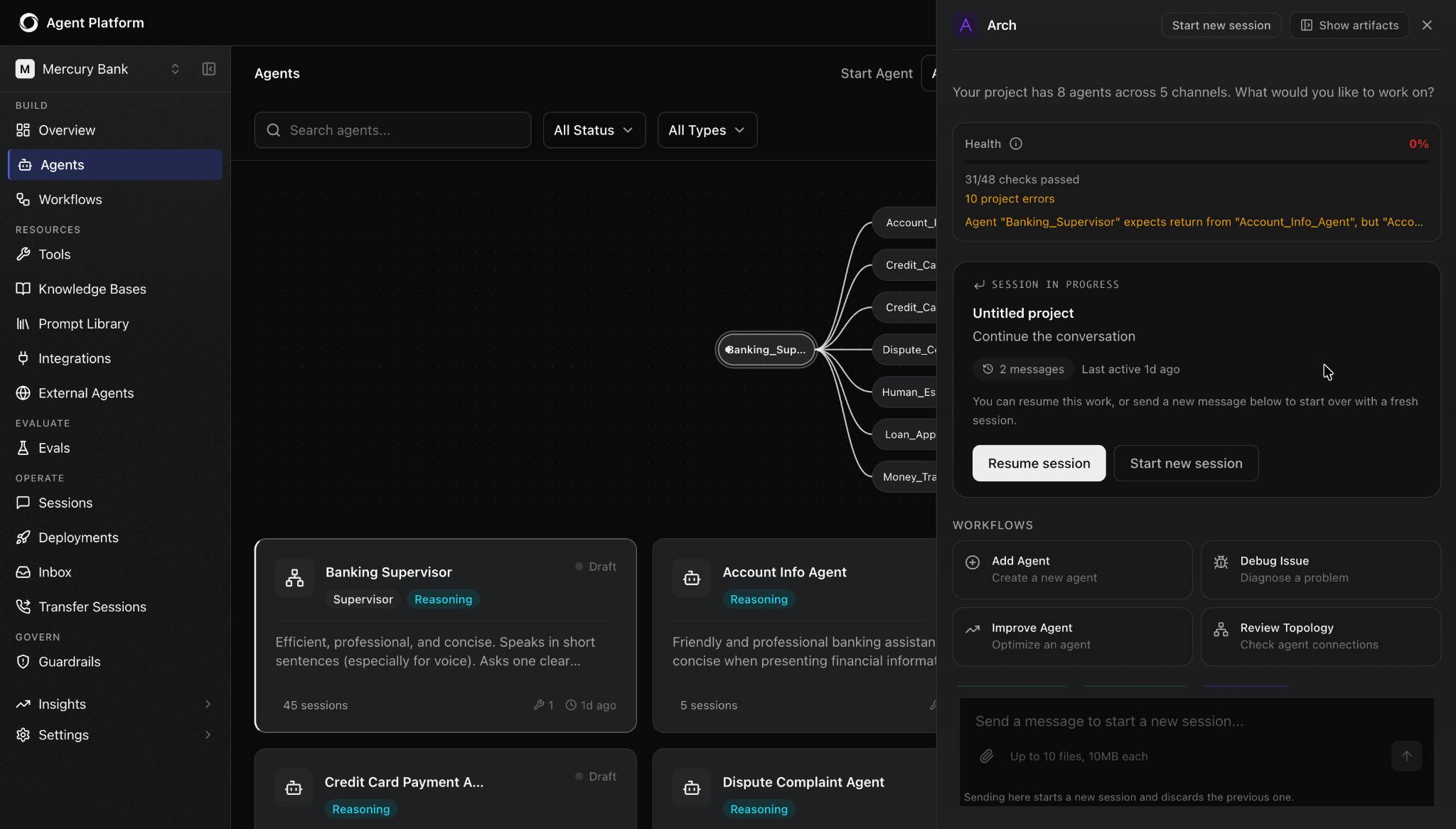
Before Arch goes ahead and builds AI agents, you get a chance to review the architecture. It shows you the proposed agent architecture, explains the responsibilities of each agent, and gives you the option to accept the design, request a change, reject it, or restart.
This is a great place to review. Ask yourself:
- Does this structure match your support process?
- Are the right agents included?
- Do you need a separate agent for refunds?
- When should the agent escalate to a human?
If something needs changing, simply describe it to Arch in plain language, and it will revise the architecture.
Once you're happy with the design, click "Create Project."
This is where magic happens. Arch builds all your AI agents in minutes. You can watch each one get a green tick (✅) as it completes. Agent logic, conversation flows, intent structures, handoff rules built right in front of you.
Step 5 - Customize each agent’s behaviour, flow, and handoff
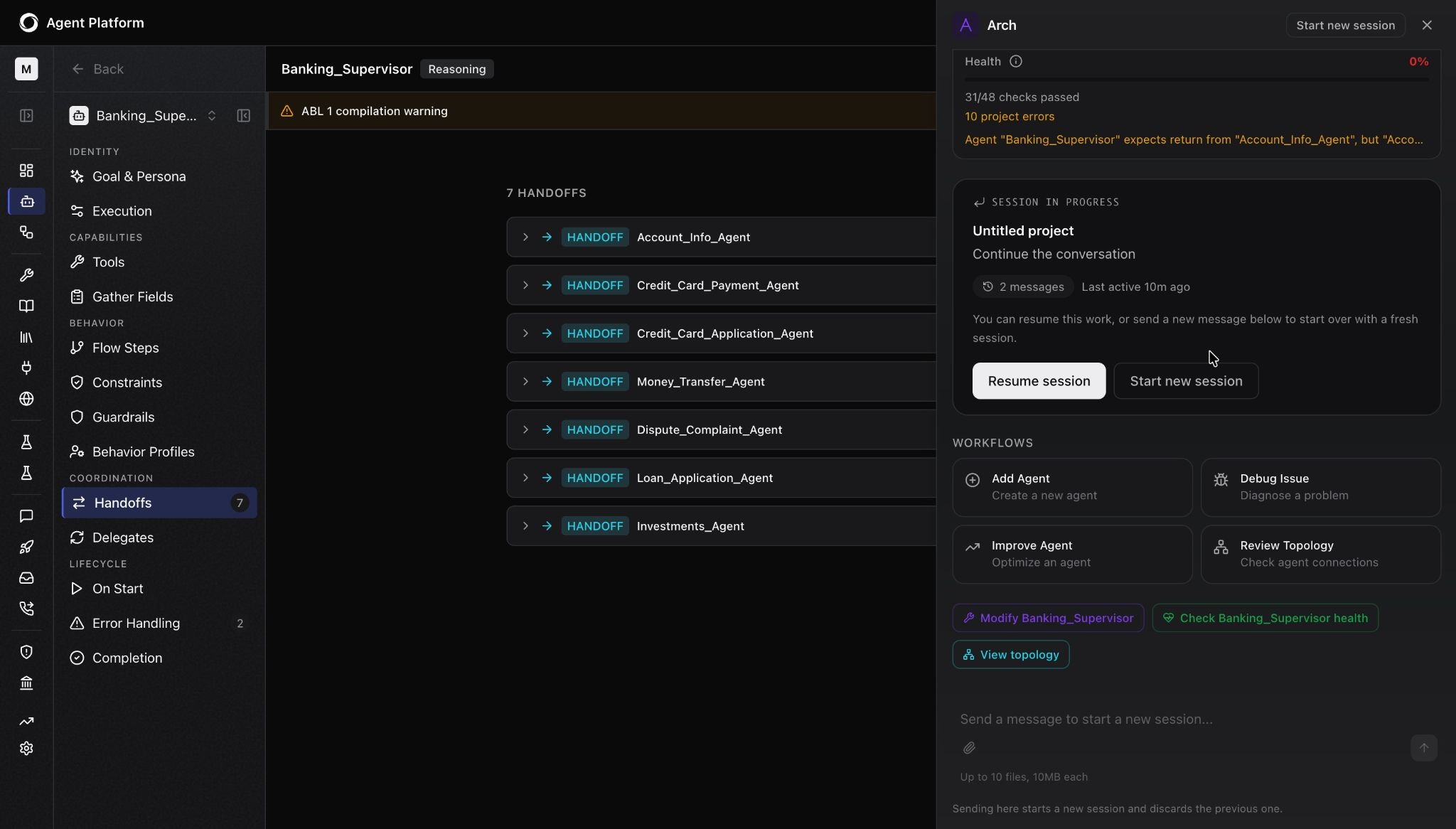
Congratulations, your AI agents are built. But they're still running on the defaults; you still need to actually make them work in your enterprise workflows.
Click into any agent, and you'll land on a configuration panel showing the core components that defines how that agent behaves:
- Goal - what this agent is trying to accomplish in every conversation
- Persona - the name, role, and character it presents to the user
- Gathered fields - the information it needs to collect to complete its task, such as order ID, email, return reason, etc.
- Flow steps - the sequence of steps the agent follows to resolve a request
- Handoff settings - exactly when and how it passes a conversation to another agent or a human
- Behaviour settings - tone (warm, professional, concise), pacing, whether it sends one message at a time or multiple, whether it interrupts the user or waits
Once your agents are built, you can keep using Arch to refine them. For instance, you can ask it to describe the routing rules in your supervisor agent, request a new handoff condition based on customer sentiment, or ask it to explain why a specific agent behaves a certain way. Arch understands each agent and makes changes precisely, showing you exactly what it's going to do before you approve.
Top tip: For technical users, Kore.ai also surfaces the underlying Agent Blueprint Language (ABL), giving you direct access to the agent's memory, tools, flows, and variables if you want deeper control.
Step 6 - Connect enterprise knowledge sources to your AI agents
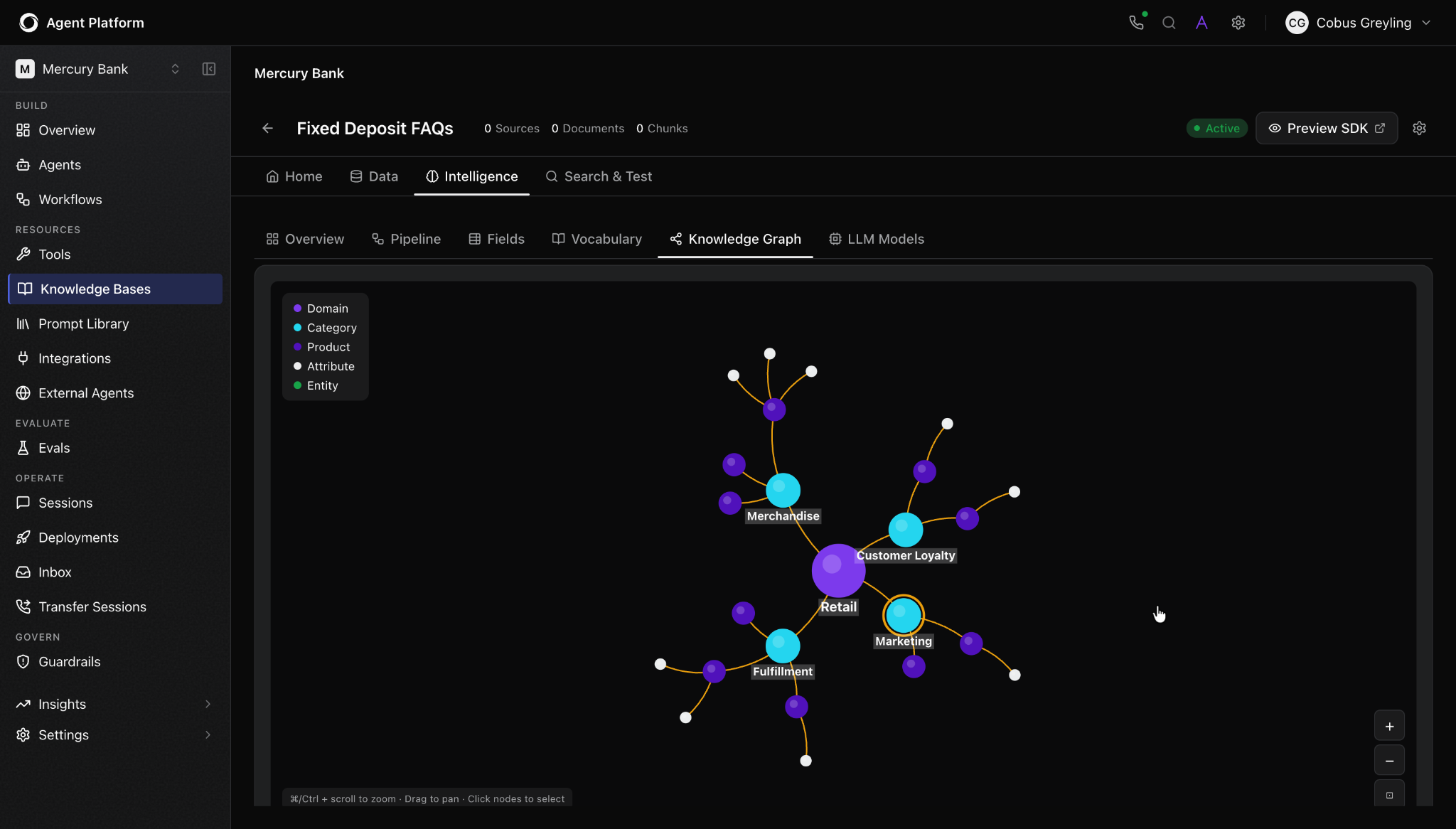
By now, you’ve configured your AI agents. But they still need your business information to provide personalized responses.
Go to Knowledge Base in the left navigation and click "New Knowledge Base." Name it, hit create, then begin data collection by uploading your documents, such as SOPs, return policy PDFs, shipping guidelines, product documentation, internal knowledge base exports, or whatever your support team actually uses to answer questions.
Click "Upload" and select your files.
The Kore.ai agent platform then extracts the content, breaks it into chunks, and maps it into a visual knowledge graph stored in a searchable data store — a live diagram showing the relationships between different pieces of information. You can zoom in and see how "fulfillment" connects to "return service," how "refund eligibility" links to "order status," and more.
Top tip: Before moving on, test the knowledge base. Use the search bar to ask common customer questions and see exactly what the agent returns. If there's a gap, you must add more content now, not after deployment.
Only when you're satisfied with one agent, open the next agent, and link it to the relevant knowledge base.
Step 7 - Add tools and integrations
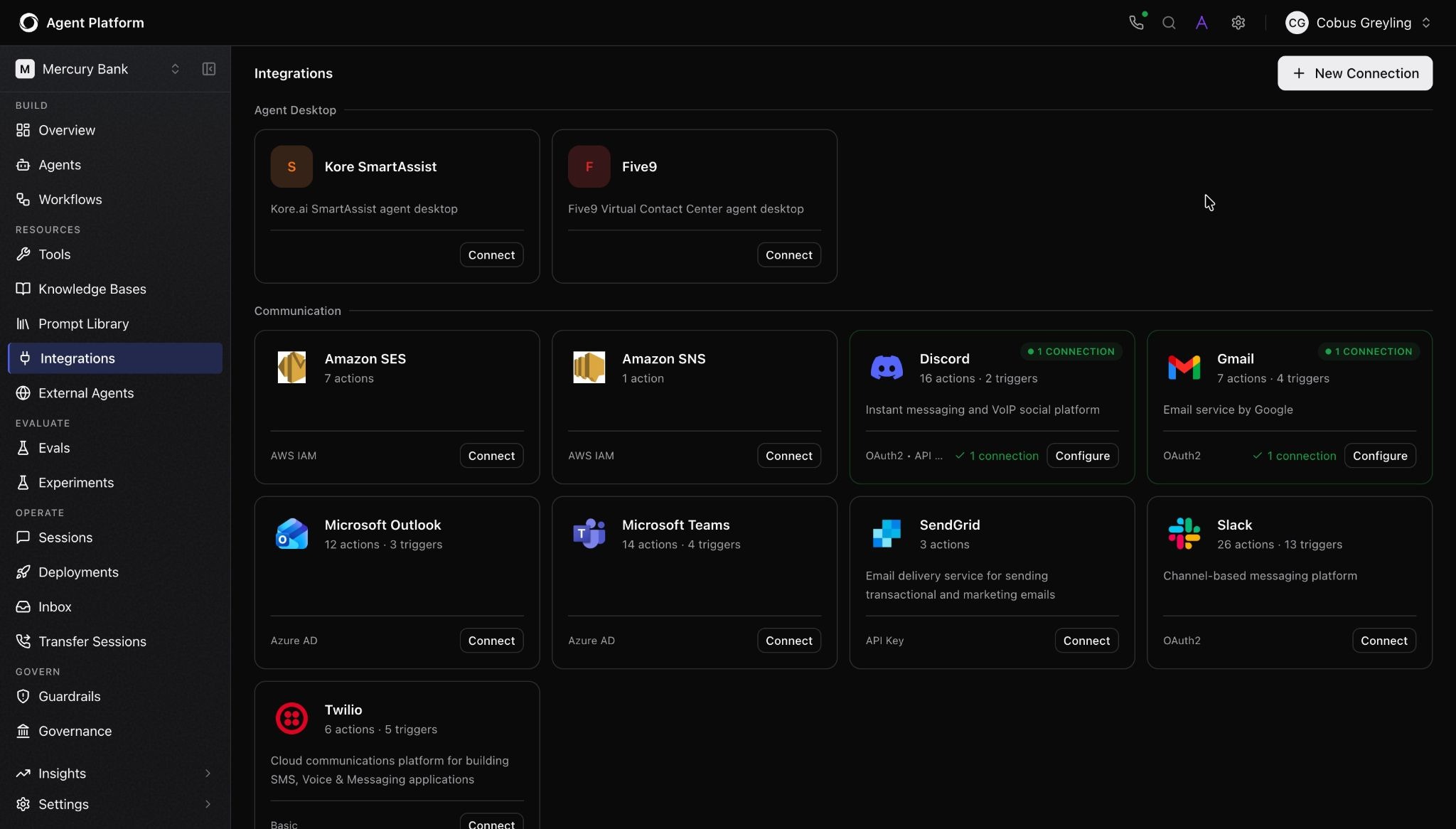
Now your AI agent can answer questions. But to be truly useful, it needs to connect to external tools and take action, such as check an order status, initiate a return, confirm a refund, or update a record in your CRM.
The good news is that Arch has already figured out which tools your agents need and mapped each one to the right agent. Navigate to the Tools section, and you'll see a pre-built list of agent integration points.
From here, you have two paths. For common enterprise systems, such as Salesforce, ServiceNow, Slack, Jira, and more, Kore.ai has pre-built connectors you can activate by simply clicking on the integration and authenticating. No code or configuration required.
For custom integrations specific to your business, you'll need to plug in your actual API endpoint and credentials, so the agent can make API calls directly into your systems. (Your backend team will know what these are.)
Top tip: Once you've added an endpoint, click "Test" to verify the integration is working before you move on. Kore.ai runs a live test call and shows you the response.
Step 8 - Add guardrails, permissions, and compliance controls
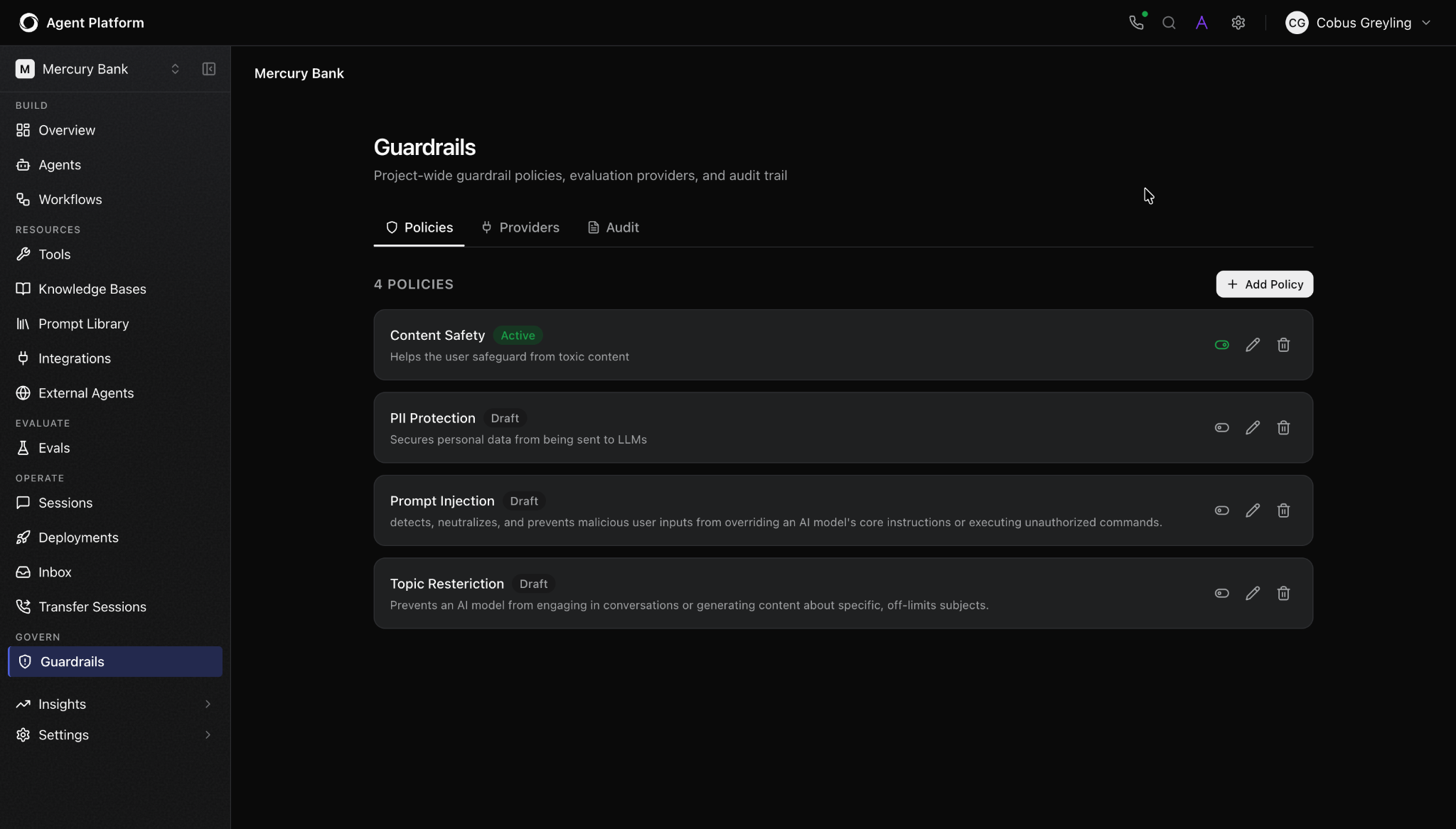
This is the step that separates the Kore.ai agent platform from everything else. It provides you with two layers of control.
Layer One: Agent-level limitation
Click into any agent, scroll to the Limitations section, and add plain-language constraints specific to that agent's job. For example, for the Refunds Agent, that might be:
- "Never approve a refund above £500 without human confirmation."
- "Do not process refunds for orders placed more than 90 days ago."
- "Always confirm the customer's identity before taking any account action."
These are are a form of prompt engineering — prompt-level guardrails; they shape the agent's decision-making directly.
Layer Two: Platform-level governance
In the left navigation, click on "Guardrails." This is where the enterprise-grade security controls live. The platform-level guardrails are enforced at the execution engine level, that is, outside the model. This means these are structural constraints that apply regardless of how the model reasons. These are important for enterprises deploying agents in regulated or high-stakes environments.
Here you can activate and configure guardrails across your entire project:
- Content safety - blocks toxic or harmful content, with configurable severity thresholds
- PII detection and redaction - automatically redacts names, emails, and payment details from outputs
- Topic restriction - stops agents from engaging with topics outside their scope
- Hallucination monitoring - flags responses not grounded in your approved knowledge sources
- Audit trail - a timestamped log of every agent decision and action, essential for compliance
- Quality scoring - continuous accuracy and compliance metrics across all live conversations
Top tip: Not sure what governance you need? Simply click on the purple “A” in the top right corner to call Arch. You can ask: "What guardrails should I add to this customer service agent?" and it will walk you through what's recommended for your use case.
Step 9 - Choose where your agents live
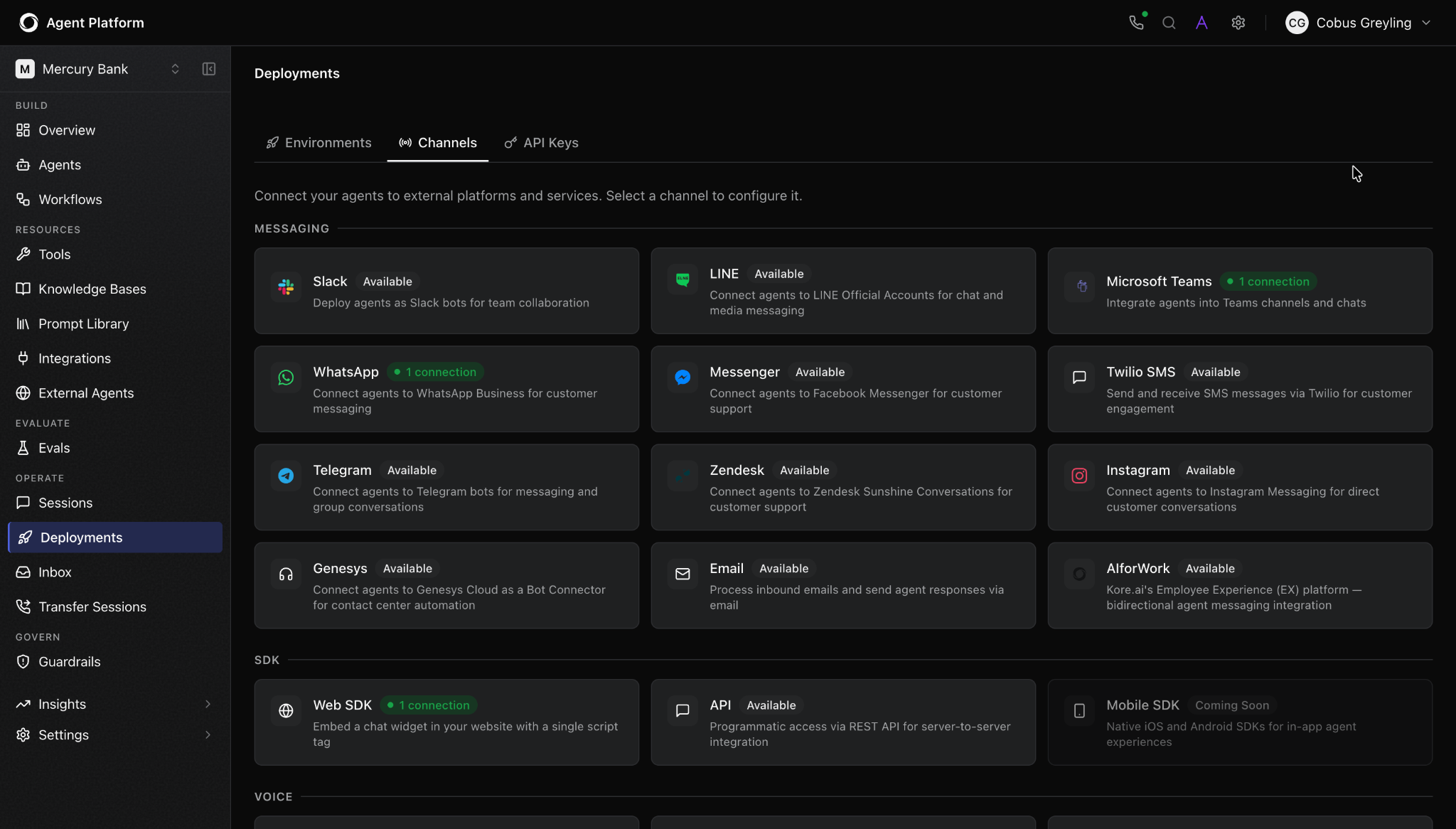
Now let's put your agents to work where your customers actually are. In the left navigation, go to "Deployment" and then "Channels." You'll see a full list of supported deployment targets.
For our customer service agent example, there are:
- Web chat
- Facebook Messenger
- Microsoft Teams
- SMS
- Voice
Click on the channel you want to configure. Each one has its own setup flow. For WhatsApp, for example, you'll need a WhatsApp Business API account. For Facebook Messenger, you'll connect through your business's Facebook page credentials.
Once a channel is connected, click "Save," and it will be available in your deployment pipeline.
Step 10 - Test and deploy your AI agents
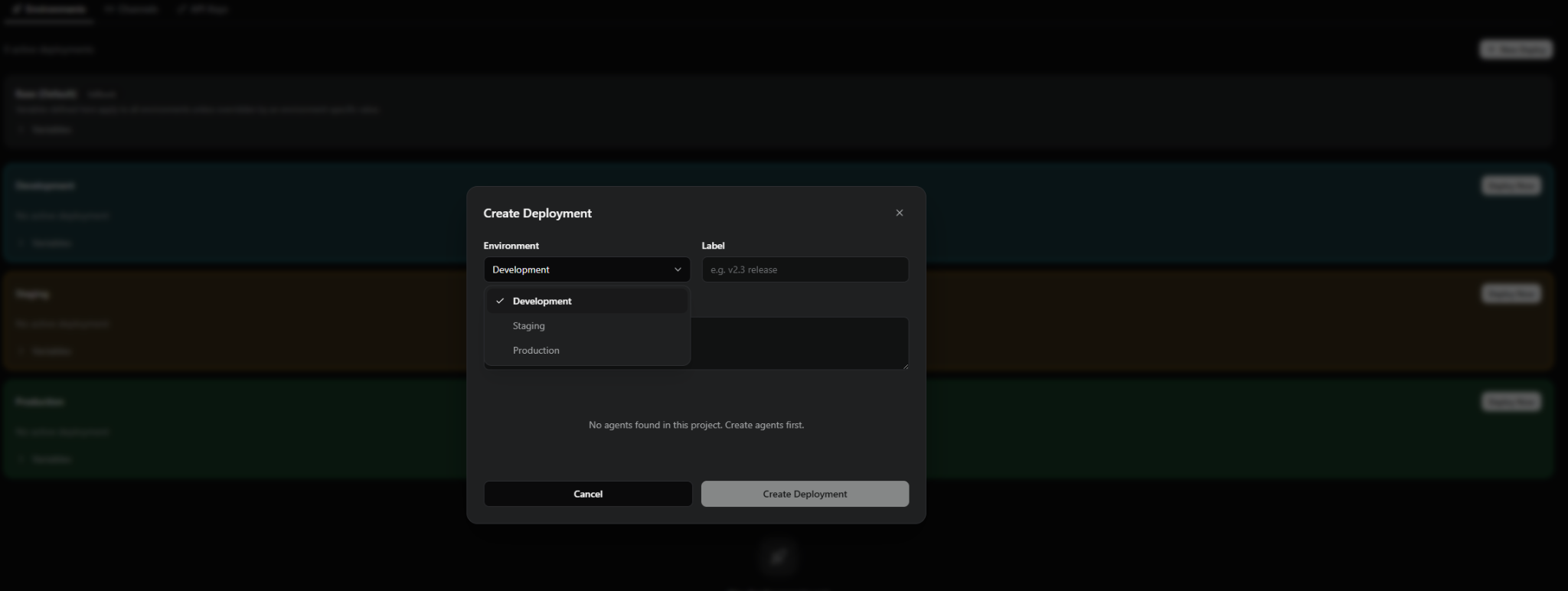
By now, you’ve done all the groundwork. But before customers interact with AI agents, you need to test how they behave.
In the Deployment section, click "New Deploy" and select Development as the environment. This creates a fully contained version of your agent; no live channels, no real users, no risk.
Click "Start a new chat" and start putting it through its paces. Ask it to track an order. Request a refund. Try to confuse it with a vague question. Ask to speak to a human. See what happens when it doesn't know something.
Alongside the chat, keep an eye on the Debug Window, a live panel that shows you exactly what's happening under the hood in real time. You can see which agent received the message, which tool was called, what the knowledge base returned, whether any guardrails fired, and where errors occurred. Fix anything that looks wrong before you go further.
Once you have completed enough live runs and are confident that the agent is behaving correctly in development, promote it to Staging. This is where you test it through the actual channels, such as WhatsApp, web chat, wherever it's going to live, with real channel behaviour but no real users.
When staging passes, click "Deploy to Production" to take your agent live.
Step 11: Monitor and improve the agent over time
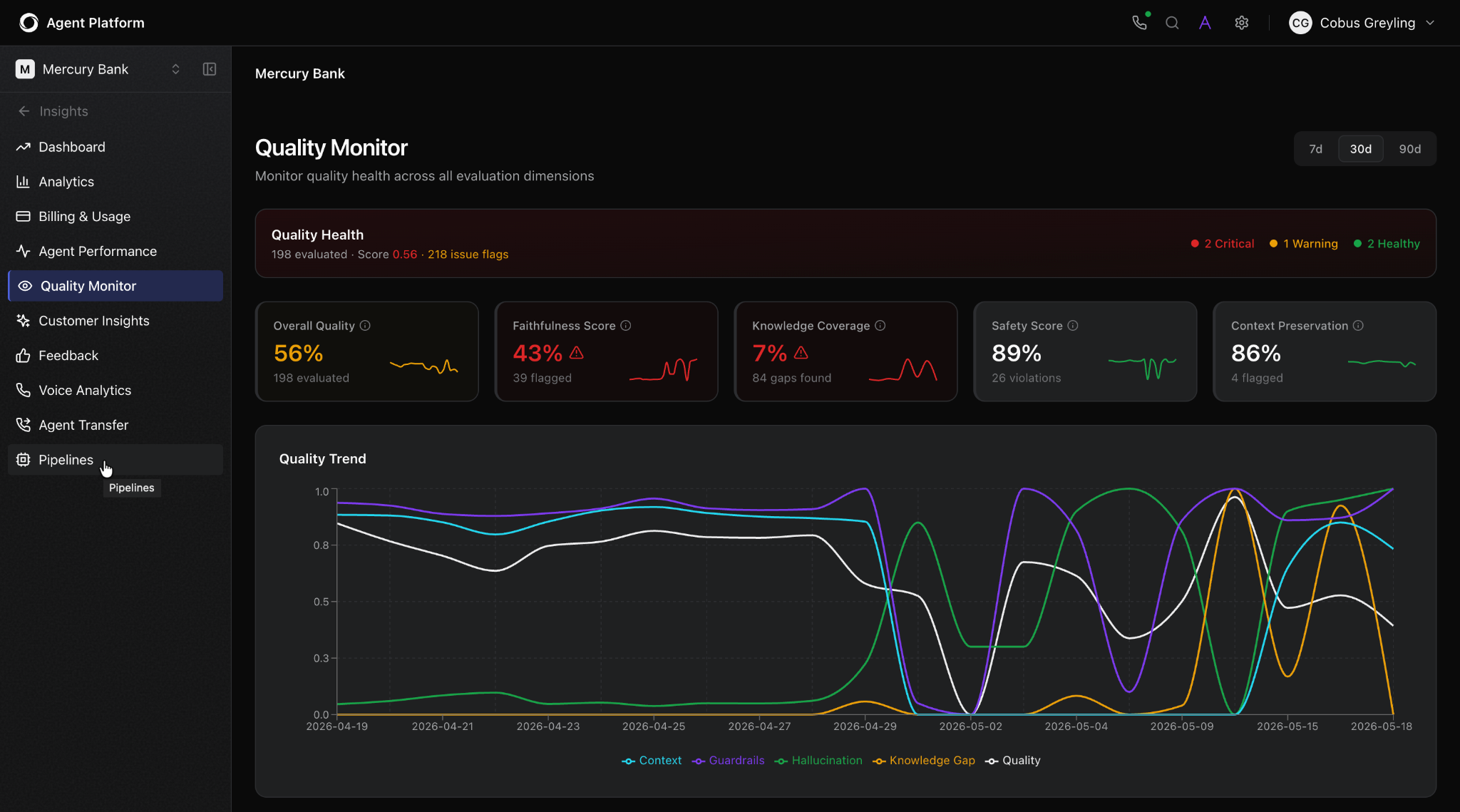
Launching AI agents is not the finish line. The best enterprise agents are the ones that get continuously improved based on real conversation data.
In the left navigation, go to "Insights." You'll land on a dashboard that gives you a real-time view of how your agent is performing across every dimension that matters:
- Containment rate - what percentage of conversations the agent resolved without needing a human.
- Escalation rate - how often it is handed off, and why.
- Quality score - a continuous measure of response accuracy, helpfulness, and compliance across all conversations.
- Knowledge gap detection - questions the agent couldn't answer well.
- Guardrail activity - how often content safety, PII, or topic restriction filters were triggered.
- ROI calculator - an actual estimate of the cost savings your agent is generating.
- LLM usage and billing - a breakdown of how much compute your agents are consuming.
Go to "Analytics" to dig into individual sessions. You can pull up any conversation, read the full transcript, see the agent's decision trail, and pinpoint exactly where something went wrong or right.
Essentially, what you’re seeing here is not just analytics; it’s operational telemetry. Specifically, a causal trace: a full record of exactly why the agent made each specific choice, what context it weighted, and which guardrail intervened at which point.
Top tip: If you're not sure what to improve first, ask Arch. It'll analyze your agent's current setup and suggest the highest-impact changes.
Final thoughts: Build production-ready AI agents
Building an AI agent has never been easier. But how hard it is to build reliable agents that work inside an enterprise mostly depends on the route you take.
A working prototype and a production-ready enterprise agent are not the same thing.
That's the gap an enterprise agent platform, like Kore.ai, is designed to close. We provide you with the infrastructure, the tooling, and the speed to go from use case to production without building everything from scratch.
If you're exploring AI agents for your organization, whether you're just getting started or trying to move something out of prototype and into production, our team can help. Request a custom demo →
FAQ
Q1. What are AI agents?
AI agents are “a computer program designed to help people by performing tasks and answering questions,” highlighting the central theme of assistance. Artificial intelligence (AI) agents help with everyday tasks, like managing emails and scheduling appointments, by learning from a variety of language inputs. There are many types of AI agents, including assistive agents and autonomous agents.
Q2. What are types of AI agents?
There are many types of AI agents. But on a high-level, there are two types:
- Assistive agents: these are embedded within employee tools for personalized tasks
- Autonomous agents: they are responsible for handling customer inquiries without human intervention
Q3. When should you build an AI agent?
Build an AI agent when rule-based automation breaks down. The clearest signals: your workflows involve nuanced judgment or context-sensitive decisions, your rules engine has become too complex to maintain, or your processes rely heavily on unstructured data like documents, emails, or customer conversations. If a simple deterministic solution can handle it cleanly, an agent is probably overkill.
Q4. What are AI agent guardrails?
Guardrails are controls that define what an AI agent can and cannot do. They include content safety filters, PII detection, topic restrictions, hallucination monitoring, and rules-based protections like blocklists and input limits. Think of them as a layered defence — no single guardrail is sufficient on its own, but together they make an agent safe to operate inside a real enterprise environment.
Q5. How do you measure whether an AI agent is actually working?
The core metrics are containment rate (conversations resolved without human intervention), escalation rate, quality score, and knowledge gap detection. But metrics alone aren't enough. You need session-level traces that show exactly why the agent made each decision — not just what happened, but the reasoning behind it. That level of visibility is what separates genuine observability from basic conversation analytics.
Q6. Do I need coding skills to build an AI agent?
Not always. Not always. Advances in machine learning have made it possible to design and configure AI agents without writing code, especially with enterprise agent platforms like Kore.ai. In this walkthrough, ARCH helps you describe your use case, design the agent architecture, generate agents, and refine them in plain language.
But if you’re building with custom code or open-source frameworks, then yes, you’ll need engineering skills.
Q7. What technology actually powers an AI agent?
Most AI agents are built on top of a large language model (LLM), which itself is typically trained using techniques like neural networks and reinforcement learning. But an LLM on its own can't take action, it can only generate text. What turns it into an agent is augmentation: giving that model access to tools, memory, and external data, sometimes called an augmented LLM. As agents increasingly need to talk to each other, the industry has also started standardizing on protocols like the Agent Communication Protocol (ACP) to help multi-agent systems exchange context reliably.
Q8. How long does it take to build an AI agent?
It depends on the complexity of the use case and the route you choose.
A simple prototype can be built quickly using AI coding tools or agent frameworks. But a production-ready enterprise agent takes longer because you need to connect systems, add knowledge, configure tools, set guardrails, test edge cases, and deploy safely.
Using Kore.ai can speed up the process because Arch helps generate the agent architecture, create agents, map tools, and guide configuration from within the platform.
Q9. How do I create an AI agent for my business?
The fundamentals of building AI agents come down to a few core steps: choosing a use case, defining the agent’s goal, designing its workflow, connecting it to knowledge sources, adding tools or APIs, setting guardrails, testing its behavior, deploying it, and monitoring performance.
For enterprises, the process should also include governance, permissions, human handoff, audit trails, and observability. That is why building a production-ready agent is different from building a quick prototype.
Q10. How much does it cost to build an AI agent from scratch?
The cost depends on the build method, complexity, number of integrations, channels, security requirements, and level of customization.
A simple prototype may be inexpensive. A custom-built enterprise agent can cost significantly more because you need engineering time for orchestration, integrations, testing, monitoring, deployment, and governance.
With an agent platform, some of that infrastructure is already available, which can reduce development effort and speed up time to value.
Q11. What is the best way to build AI agents for enterprises?
For experiments, custom code or open-source frameworks may be enough. For enterprises, the better option is usually a purpose-built agent platform because it gives teams a more complete foundation for architecture, integrations, knowledge, governance, deployment, and monitoring.
This is because enterprises need to operate safely inside real workflows, connect to business systems, follow policies, escalate to humans, and improve over time.
Q12. Can AI agents handle more than just text?
Yes. Modern multimodal models can process images, voice, and documents alongside text, which is useful for use cases like processing receipts or analyzing screenshots. On the output side, agents also rely on structured outputs, forcing the model to return data in a fixed format like JSON, so that a tool call or API request downstream doesn't break. This structured data generation is part of what makes tool use reliable rather than a guessing game.
Q13. Is an AI agent just a customer support chatbot?
Not quite. A customer support chatbot typically use generative AI to answer questions from a script or FAQ. An AI agent goes further: it can look up an order, initiate a refund, update a CRM record, and hand off to a human when needed. The line has blurred as chatbots get smarter, but the practical difference is action versus answers.
Share
Tags