Integrating AI agents with tools: Define, test, and trace every call

Summary
An AI agent can reason about what a customer needs, but only governed tools let it act on real systems. This blog explains how Artemis connects agents to backend systems by answering four questions: what the agent can do, how a call reaches your system, whether it returns the right data, and what happened in a live conversation. It covers business-capability tools, testing without the model, and runtime traces.
What’s on this page
Integrating AI agents with tools: Define, test, and trace every call
An AI agent can reason to take an action. Only governed tools make it happen.
Imagine asking your bank app: "Did my rent payment go through? I want to move the remaining balance to savings."
A modern AI agent can read that message and instantly map out the logic: verify identity, query pending transactions, pull the ledger balance, and execute a transfer.
But AI stops at the chat window. It possesses no internal access to your account and has never seen your transaction history. Without a bridge to the backend, it cannot move a single dollar on its own.
An AI agent can reason about what a customer needs. But to touch a real account, it needs tools.
Tools turn decisions into actions
In Artemis, tools bridge model reasoning and backend infrastructure. They perform three distinct types of work:
The work splits in two. The agent decides when a tool is needed and with what inputs. The platform makes the call and returns structured data. Artemis is built this way so the agent always reasons over data it never wrote.
Where integrations break
Wiring a model to an API takes an afternoon. However, three problems surface later, in production.
- Endpoints leak into prompts: Mapping tools 1:1 to raw APIs forces the model to navigate backend architecture rather than business intent.
- Plausible hallucinations: When a call times out or returns empty, unmonitored models improvise fluent, wrong answers.
- Transcripts obscure root causes: A bad answer looks identical whether routing failed, the model hallucinated, or the database glitched.
This is why connecting an agent to your systems means answering four questions:
- What can the agent do?
- How does a call reach your system?
- Does that call return the right data?
- And when the agent uses it, what happens?
Define the agent by business capability
The first question is what the agent can do. Artemis answers it with business capabilities rather than endpoints.
Consider two tools that call the same accounts service. One reads a balance. The other writes a new balance after a transfer. To an integration engineer, they are one endpoint. To an AI agent, however, they are different jobs with entirely different risk profiles: one is safe to run at any time, and the other moves money. So Arch makes them two tools.
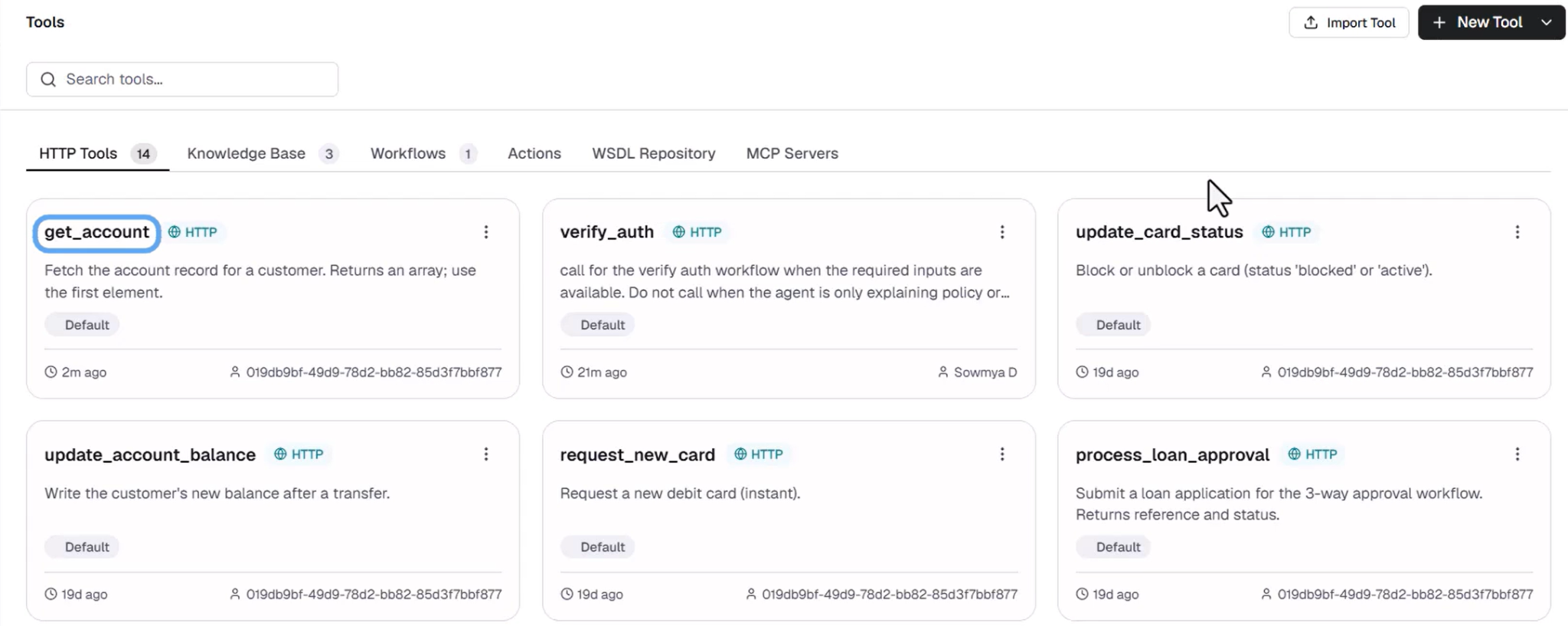
(Each tool names one capability and tells the agent when to use it.)
In Artemis, Arch generates tools based on business capabilities rather than backend schemas, keeping raw infrastructure out of the prompt. The description is written specifically for the model so it understands the conditions under which the tool should be called. The underlying network request is managed entirely by the platform.
Note: You don’t have to start from a blank screen. Arch generates a starting set of agents and tools from your procedures, and maps each tool to the agent that uses it.
Connect the call to your systems
The second question is how a call reaches your system. Artemis offers two routes.
Use a pre-built integration. For systems such as Gmail, ServiceNow, Slack, Jira, GitHub, and more, you sign in once, and the connector's tools are ready to use.
Set up the call yourself. This is the route for custom integrations. Here you give the tool an endpoint and an auth profile, and mark where the agent's inputs go.
The agent only provides the values, like a customer ID. The platform builds the request, adds the credentials, and makes the call. This means the model can't build a malformed request or call an endpoint you didn't set up, and the credentials never pass through it. Those are fixed when you configure the tool.
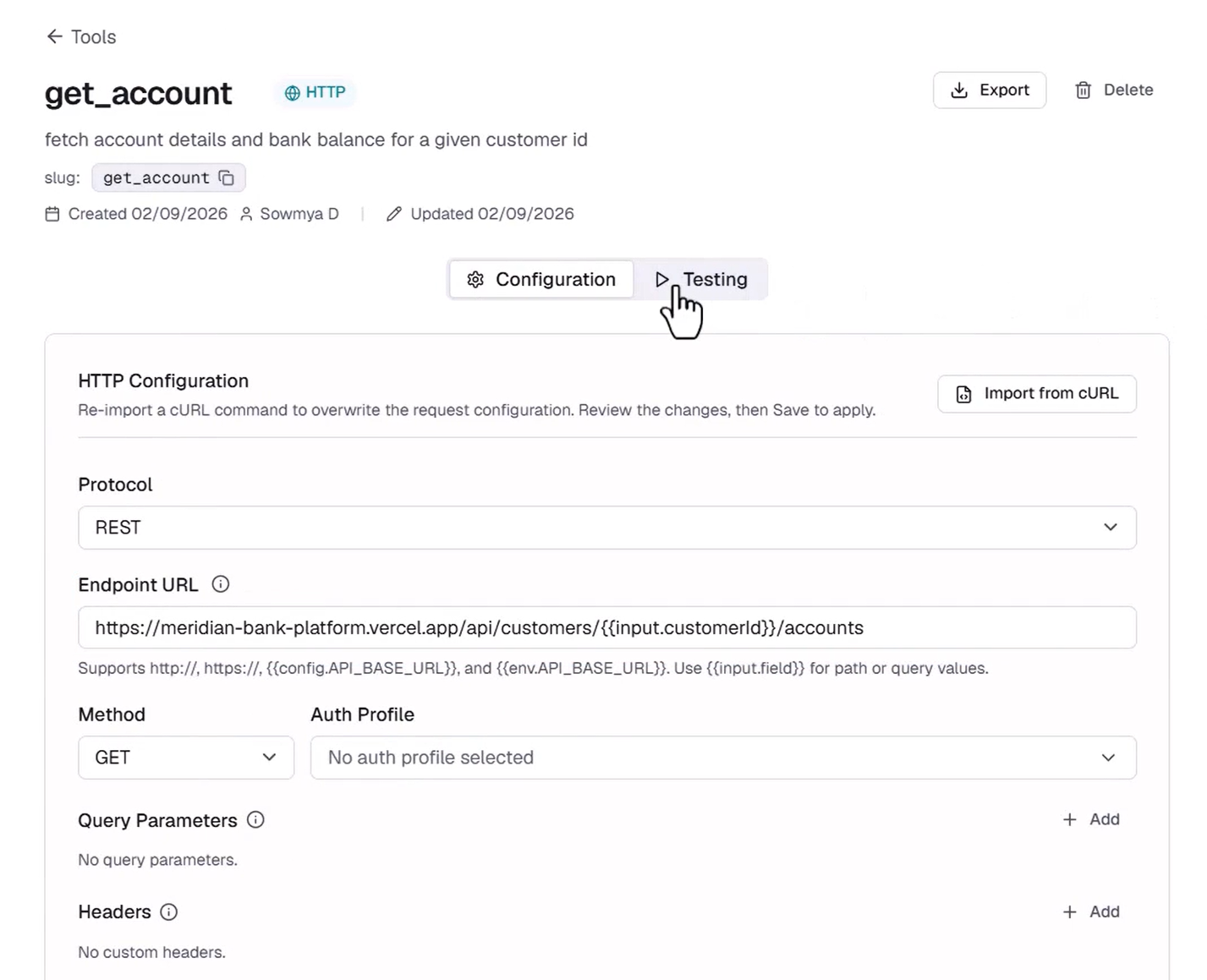
Once a tool is set up, you can test it.
Test the data paths in isolation
The third question is whether the call returns the right data. Artemis answers it completely isolated from any language model or before any agent is involved.
Every tool runs on its own. You enter sample inputs, execute, and see the exact request sent and the raw response returned. Say, if we pass a customer ID into the test runner, the platform executes the request and returns the checking and savings balances.
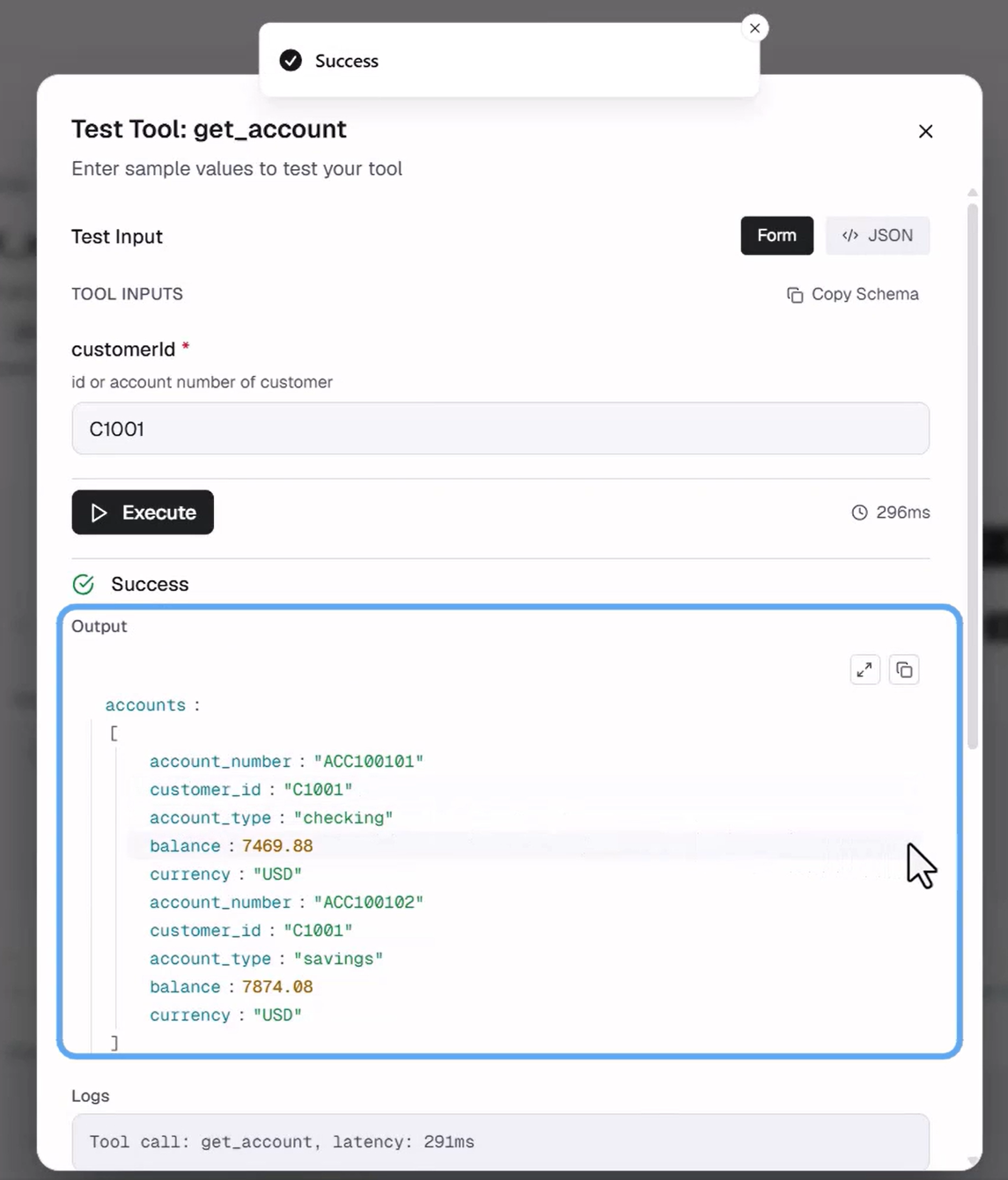
This answers the question of whether the backend service returns the expected data in the shape the agent requires. Every field in that response came from the system of record. The agent generated none of it.
What the test cannot tell you, though, is whether the agent will call the tool at the right moment. That takes a live conversation.
Trace the call in a live conversation
The last question is what happened when an agent used the tool for real.
In a live conversation, a request for balance travels a path. A supervisor agent routes it to an accounts specialist. That agent calls a model, decides it needs the balance tool, and supplies the customer's ID. The platform calls the bank, and the agent replies with what came back.
The runtime trace records each step:
- The routing decision and which agent received the request
- Each model call
- The tool invocation and its inputs
- The data returned
- The resulting action and reply
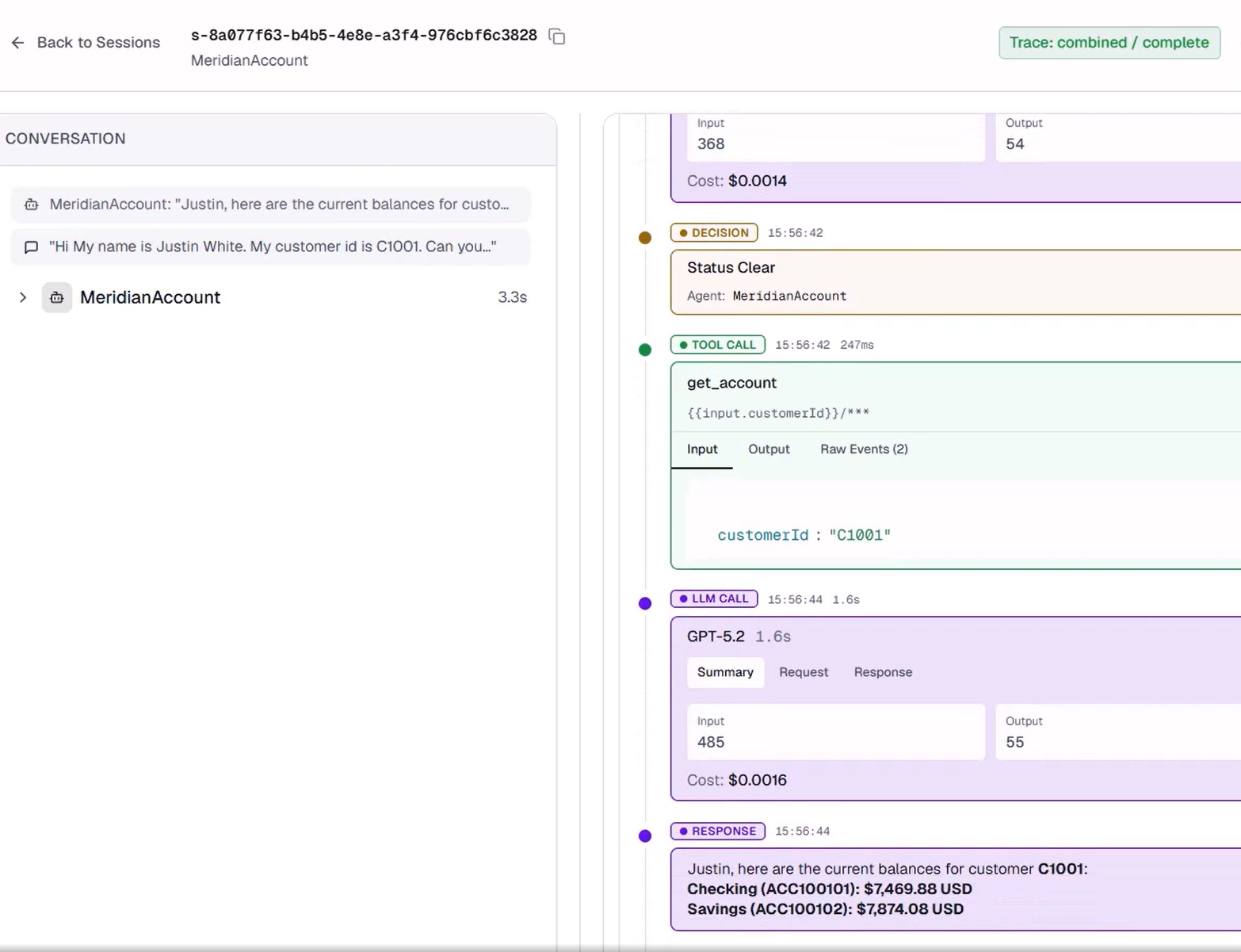
When an answer is wrong, the trace names the layer. If the tool returned the right balance and the agent misread it, you fix the agent. If the tool returned an empty array and the agent answered anyway, you fix how the agent handles an empty result. If the backend returned a 500 error, you fix the API connection. In a plain text transcript, all three look identical. The trace isolates the failure.
Every tool widens what an agent can do
As more tools connect, agents do more: they retrieve information, update records, trigger workflows, and initiate transactions. Each tool widens what an agent can change in your business.
That is why Artemis describes each one by its job, tests it in isolation, and keeps it visible in every trace.
Share